pygfx.objects.Ruler
- class pygfx.objects.Ruler(*, start_pos: tuple[float, float, float] = (0, 0, 0), end_pos: tuple[float, float, float] = (0, 0, 0), start_value: float = 0.0, ticks: list | None = None, tick_format: str | Callable = '0.4g', tick_side: Literal['left', 'right'] = 'left', tick_marker: Literal['tick', 'tick_left', 'tick_right'] = 'tick', tick_size: float = 8.0, ticks_at_end_points=False, min_tick_distance: float = 50.0, color: str | tuple[float, float, float, float] = '#fff', line_width: float = 2.0, alpha_mode: str | None = None, render_queue: int | None = None)
Bases:
WorldObjectAn object to represent a ruler with tickmarks.
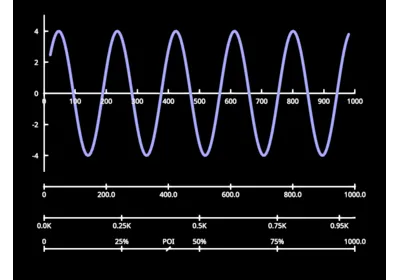
Can be used to measure distances in a scene, or as an axis in a plot. The ruler object is a “compound” object; it has text, lines, and points as child objects.
Usage:
Use the properties (most notably
start_posandend_pos).Call
update()on each draw.
- Parameters:
start_pos (tuple[float, float, float]) – The initial position of the start of the ruler.
end_pos (tuple[float, float, float]) – The initial position of the end of the ruler.
start_value (float) – The value (offset) at the start of the ruler.
ticks (array-like or None) – A list of values, in world-space from the ruler’s start_pos, where ticks should be drawn. If not given or None, this will be determined automatically.
tick_format (str | Callable) – The format to represent ticks with, or a function to convert floats to str. Default “0.4g”.
tick_side (str) – Whether the tick texts are on the ‘left’ or ‘right’ of the line (from the p.o.v. of the ruler). Default left.
tick_marker (str) – Any marker from the PointsMarkerMaterial. Sensible values are ‘tick’, ‘tick_left’, and ‘tick_right’.
tick_size (float) – The size of the tickmarks (in logical screen pixels). When using half ticks (tick_marker is ‘tick_left’ or ‘tick_right’, the effective size is halved). Default 8.
ticks_at_end_points (bool) – Whether to draw ticks at the ruler’s strat and end. Default False
min_tick_distance (float) – The minimal distance between ticks in screen pixels, when using auto-ticks. Default 50.
color (str | tuple[float, float, float, float]) – The color for the internal line, points and text objects. Default white.
line_width (float) – The width of the line and tickmarks. Default 2.0.
alpha_mode (str | None) – Override the default alpha mode for the line, points and text.
render_queue (int | None) – Override the default render queue for the line, points and text.
- get_bounding_box()
Axis-aligned bounding box in local model space.
- Returns:
aabb – An axis-aligned bounding box, or None when the object does not take up a particular space.
- Return type:
ndarray, [2, 3] or None
- property line
The line object that shows the ruler’s path.
- property points
The points object that shows the ruler’s tickmarks.
- property text
The text object that shows the ruler’s tick labels.
- property start_pos
The start posision of the ruler, in model space.
Note that the ruler’s transform also affects positioning, but should generally not be used.
- property end_pos
The end posision of the ruler, in model space.
- property ticks
The ticks to show.
Nonefor automatic ticks.dictfor explicit ticks. Values can be str or float. If float, they are formatted withtick_format.list/tuple/ndarrayfor a list of values.
- property tick_format: str
The format to display the tick values.
A string to use as the second arg in
format(), default “0.4g”.“km” to use mili/Kilo/Mega/Giga suffixes.
A function that maps (value, min_value, max_value) to a str.
- property tick_side: str
Whether the ticks are on the ‘left’ or ‘right’ of the line.
Imagine standing on the start position, with the line in front of you.
- property tick_marker: str
The marker used for the ticks.
Alias for
ruler.points.material.marker.This can be any value in
pygfx.utils.enums.MarkerShape. Sensible values include ‘tick’, ‘tick_left’, and ‘tick_right’.
- property min_tick_distance: float
The minimal distance between ticks in screen pixels, when using auto-ticks.
- property color
The color of the ruler components.
The getter is an alias for
ruler.text.material.color. Setting this value setsruler.text.material.color,ruler.line.material.color, andruler.points.material.edge_color.
- property line_width: float
The width of the line and tickmarks.
The getter is an alias for
ruler.line.material.thickness. Setting this value setsruler.line.material.thicknessandruler.points.material.edge_width.
- update(camera, canvas_size)
Update the ruler.
This must be called on every draw, right before rendering.
Returns a dictionary with the following fields:
“tick_step”: the calculated auto-tick-step.
“tick_values”: the tick values that will be shown.