pygfx.objects.Text
- class pygfx.objects.Text(geometry=None, material=None, *, text=None, markdown=None, font_size=12, family=None, direction=None, screen_space=False, anchor='middle-center', anchor_offset=0, max_width=0, line_height=1.2, paragraph_spacing=0, text_align='start', text_align_last='auto', visible: bool = True, render_order: float = 0, name: str = '')
Bases:
WorldObjectRender a piece of text.
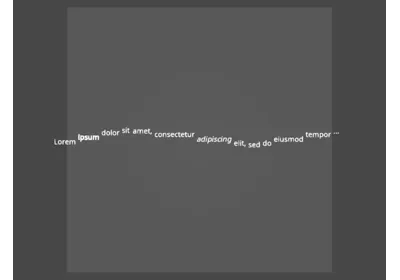
Can be used to render a piece of multi-paragraph text. Supports plain text as well as formatting with (a subset of) markdown.
Updates to text are relatively efficient, because text is internally divided into text blocks (for lines/paragraphs). Use
MultiTextif you want to directly control the text blocks.- Parameters:
geometry (Geometry | str) – The geometry on which the
Textwill store the buffers required to render the text (“positions” and “glyph_data”). If omitted, a new geometry is created automatically. This argument can also be used to provide the text to render as a string (as an alias for the text arg).material (TextMaterial) – The text material to use. Can be omitted.
text (str | list[str]) – The plain text to render (optional). The text is split in one TextBlock per line, unless a list is given, in which case each (str) item become a TextBlock.
markdown (str | list[str]) – The text to render, formatted as markdown (optional). See
set_markdown()for details on the supported formatting. The text is split in one TextBlock per line, unless a list is given, in which case each (str) item become a TextBlock.font_size (float) – The size of the font, in object coordinates or pixel screen coordinates, depending on the value of the
screen_spaceproperty. Default 12.direction (str | None) – The text direction overload.
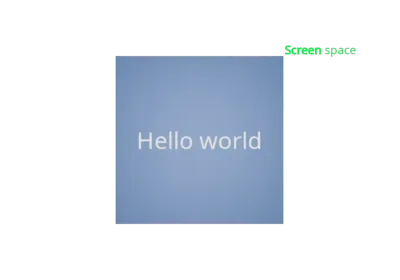
screen_space (bool) – Whether the text is rendered in model space or in screen space (like a label). Default False (i.e. model-space).
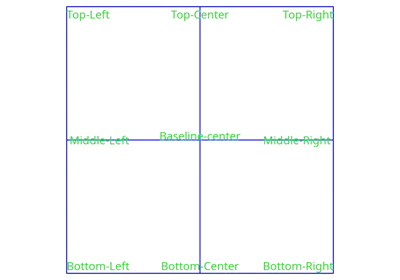
anchor (str | TextAnchor) – The position of the origin of the text. Default “middle-center”.
anchor_offset (float) – The offset (extra margin) for the ‘top’, ‘bottom’, ‘left’, and ‘right’ anchors.
max_width (float) – The maximum width of the text. Words are wrapped if necessary. Default zero (no wrapping).
line_height (float) – A factor to scale the distance between lines. A value of 1 means the “native” font’s line distance. Default 1.2.
paragraph_spacing (float) – An extra space between paragraphs. Default 0.
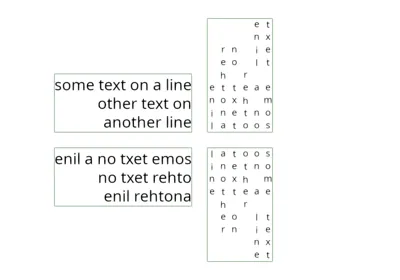
text_align (str | TextAlign) – The horizontal alignment of the text. Can be “start”, “end”, “left”, “right”, “center”, “justify” or “justify_all”. Default “start”. Text alignment is ignored for vertical text (direction ‘ttb’ or ‘btt’).
text_align_last (str | TextAlign) – The horizontal alignment of the last line of the content element. Default “auto”.
- property font_size
The font size.
For text rendered in screen space (
screen_spaceproperty is set), the size is in logical pixels, and the object’s local transform affects the final text size.For text rendered in world space (
screen_spaceproperty is not set), the size is in object coordinates, and the the object’s world-transform affects the final text size.Note that font size is indicative only. Final glyph size further depends on the font family, as glyphs may be smaller (or larger) than the indicative size. Final glyph size may further vary based on additional formatting applied a particular subsection.
- property family
The font family to use.
The name(s) of the font to prefer. If multiple names are given, they are preferred in the given order. Characters that are not supported by any of the given fonts are rendered with the default font (from the Noto Sans collection).
- property direction
The font direction overload.
If not set (i.e. set to None), the text direction is determined automatically based on the script, selecting either ‘ltr’ or ‘rtl’ (Asian scripts are rendered left-to-right by default).
If set, valid values are ‘ltr’, ‘rtl’, ‘ttb’, or ‘btt’. Can also specify two values, separated by a dash (e.g. ‘ttb-rtl’) to specify the word-direction and line-direction, respectively.
- property screen_space
Whether to render text in screen space.
False: Render in model-pace (making it part of the scene), and having a bounding box.
True: Render in screen-space (like a label).
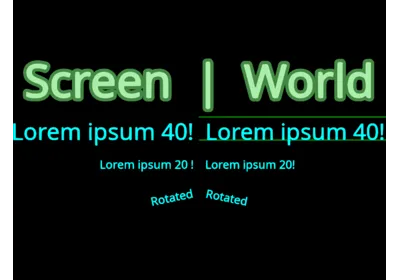
Note that in both cases, the local object’s rotation and scale will still transform the text.
- property anchor
The position of the origin of the text.
Represented as a string representing the vertical and horizontal anchors, separated by a dash, e.g. “top-left” or “bottom-center”.
Vertical values: “top”, “middle”, “baseline”, “bottom”.
Horizontal values: “left”, “center”, “right”.
- property anchor_offset
The offset (extra margin) for the ‘top’, ‘bottom’, ‘left’, and ‘right’ anchors.
- property max_width
The maximum width of the text.
Text will wrap if beyond this limit. The coordinate system that this applies to is the same as for
font_size. Set to 0 for no wrap (default).For vertical text, this value indicates the maximum height.
- property line_height
The relative height of a line of text.
Used to set the distance between lines. Default 1.2. For vertical text this also defines the distance between the (vertical) lines.
- property paragraph_spacing
The extra margin between two paragraphs.
Measured in text units (like line height and font size).
- property text_align
Set the alignment of wrapped text. Default ‘start’.
See
pygfx.utils.enums.TextAlign:Text alignment is ignored for vertical text (direction ‘ttb’ or ‘btt’).
- property text_align_last
Set the alignment of the last line of text. Default “auto”.
See
pygfx.utils.enums.TextAlign:Text alignment is ignored for vertical text (direction ‘ttb’ or ‘btt’).
- set_text(text: str | List[str])
Set the full text.
Each line (i.e. paragraph) results in one TextBlock, unless a list is given, in which case each (str) item become a TextBlock.
On subsequent calls, blocks are re-used, and blocks that did not change have near-zero overhead (only lines/blocks that changed need updating).
- set_markdown(text: str | List[str])
Set the full text, formatted as markdown.
The supported markdown features are:
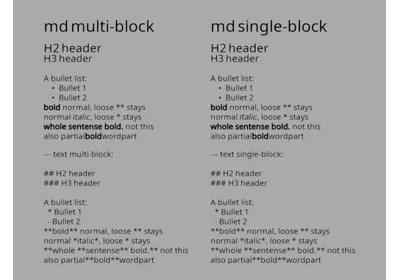
**bold** and *italic* textis supported for words, word-parts, and (partial) sentences, but not multiple lines (formatting state does not cross line boundaries).# h1,## h2,### h3, etc.* bullet points.
Each line (i.e. paragraph) results in one TextBlock, unless a list is given, in which case each (str) item become a TextBlock.
On subsequent calls, blocks are re-used, and blocks that did not change have near-zero overhead (only lines/blocks that changed need updating).