Note
Go to the end to download the full example code.
Image Histogram Analysis
Compute the histogram of an image, on the GPU, using compute shaders.
Note that the `` pygfx.utils.compute.ComputeShader`` is experimental and can change/move in the future.
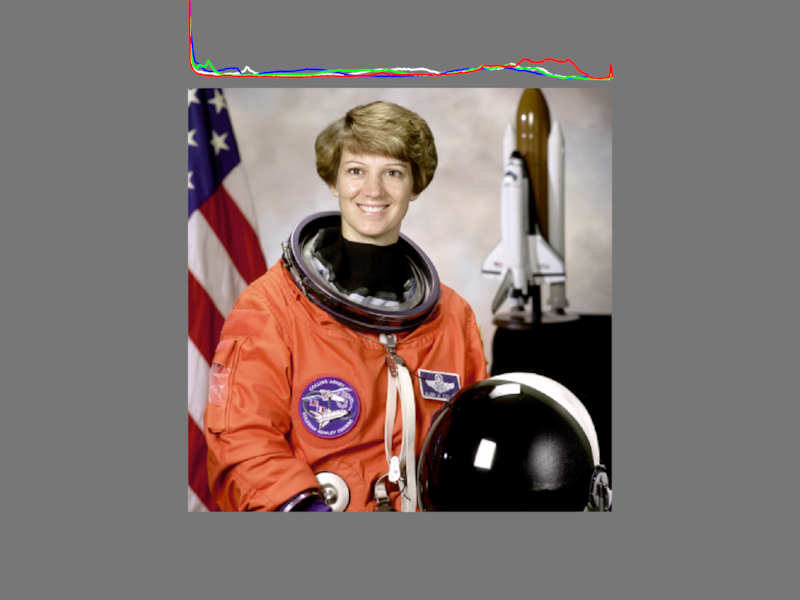
import numpy as np
import imageio.v3 as iio
from rendercanvas.auto import RenderCanvas, loop
import wgpu
from wgpu.utils.imgui import ImguiRenderer
from imgui_bundle import imgui

import pygfx as gfx
from pygfx.utils.compute import ComputeShader


# Get list of available standard images
standard_images = [
    "astronaut",
    "camera",
    "checkerboard",
    "clock",
    "coffee",
    "horse",
    "hubble_deep_field",
    "immunohistochemistry",
    "moon",
    "page",
    "text",
]

# Hard-coded number of bins
nbins = 256

# Initialize canvas and renderer
canvas = RenderCanvas(size=(800, 600))
renderer = gfx.renderers.WgpuRenderer(canvas)

# Scene, camera, controller
scene = gfx.Scene()
scene.add(gfx.Background.from_color("#777"))
camera = gfx.OrthographicCamera()
controller = gfx.PanZoomController(camera, register_events=renderer)


def load_image(image_name):
    im = iio.imread(f"imageio:{image_name}.png")
    if im.ndim == 2:
        im = np.stack([im, im, im], axis=2)
    return im


# Create initial image texture.
# Note how we set the usage. We set STORAGE_BINDING so we can use it in a compute  shader.
# We also set TEXTURE_BINDING because we also want to render the image.
image_texture = gfx.Texture(
    load_image(standard_images[0]),
    dim=2,
    usage=wgpu.TextureUsage.STORAGE_BINDING | wgpu.TextureUsage.TEXTURE_BINDING,
)

# Create image object from the texture.
# The image object stays the same, we swap out its texture when the user selects an image.
image_object = gfx.Image(
    gfx.Geometry(grid=image_texture),
    gfx.ImageBasicMaterial(clim=(0, 255)),
)
image_object.local.scale_y = -1
scene.add(image_object)


# Create a buffer to store bins for the histogram, separately for rgb and luminance.
# The COPY_DST usage is needed to be able to clear the buffer (to zeros).
histogram_bins_buffer = gfx.Buffer(
    nbytes=nbins * 4 * 4,
    nitems=nbins,
    format="4xu4",
    usage=wgpu.BufferUsage.STORAGE | wgpu.BufferUsage.COPY_DST,
)

# Create a buffer that holds the line positions. This is written to by a compute shader.
# It consists of 4 pieces (red, green, blue, luminance), with nans in between.
histogram_line_buffer = gfx.Buffer(
    nbytes=(4 * nbins + 3) * 3 * 4,
    nitems=(4 * nbins + 3),
    format="3xf4",
    usage=wgpu.BufferUsage.STORAGE,
)

# Color each line-piece
histogram_colors = np.zeros(((4 * nbins + 3), 3), np.float32)
histogram_colors[0 * nbins + 0 : 1 * nbins + 0] = (1, 0, 0)
histogram_colors[1 * nbins + 1 : 2 * nbins + 1] = (0, 1, 0)
histogram_colors[2 * nbins + 2 : 3 * nbins + 2] = (0, 0, 1)
histogram_colors[3 * nbins + 3 : 4 * nbins + 3] = (1, 1, 1)

# Create the line object with that buffer
histogram_object = gfx.Line(
    gfx.Geometry(positions=histogram_line_buffer, colors=histogram_colors),
    gfx.LineMaterial(color="yellow", color_mode="vertex"),
)
histogram_object.local.y += 10
histogram_object.local.scale_y = 1
histogram_object.local.scale_x = image_texture.size[0] / (nbins - 1)
scene.add(histogram_object)


# Update camera to show the image and histogram
camera.show_object(scene)


# --- Create compute shaders
#
# We use two shaders: one to calculate the histogram and store the
# result in an uint32 buffer, the other to use that buffer to set the
# positions buffer of a line object. Making stuff like this fast is not
# trivial. Basically you want to paralellize as much as you can, and
# avoid locking when multiple threads write to the same memory.

# In the current implementation, this is partially solved by using a
# workgroup, which has its own temporary histogram, so that the
# different workgroups don't get in each-others way. After that. each
# thread in a workgroup is then responsible for adding a single
# histogram value to the final histogram buffer.
#
# The second shader simply copies values from the histogram into the
# positions buffer, where we can use 1024 cores, so it's parellized
# pretty well.
#
# Took inspiration from https://webgpufundamentals.org/webgpu/lessons/webgpu-compute-shaders-histogram.html
# but implemented a slightly simpler variant of its final one.
# It is very likely that a more performant implementation exists. But it's also
# likely that what its the most efficient version depends on the hardware.
#
# About workgroup/invocation id's:
#
# * local_invocation_id: the vec3 indicating the current invocation into the
#   workgroup, as specified using @workgroup_size,  i.e. its position in the
#   workgroup grid.
# * local_invocation_index: the u32 represening the 'flat' local_invocation_id.
# * workgroup_id: the vec3 indicating the position of the workgroup in overall
#   compute shader grid, as specified by dispatch_workgroups().
# * global_invocation_id: workgroup_id * workgroup_size + local_invocation_id.


histogram_wgsl = """

const chunkWidth = 16u;
const chunkHeight = 16u;
const chunkDepth = 4u;

const chunkSize = chunkWidth * chunkHeight * chunkDepth;
const binCount = chunkWidth * chunkHeight;
var<workgroup> bins: array<atomic<u32>, chunkSize>;


@group(0) @binding(0) var imageTexture: texture_2d<f32>;
@group(0) @binding(1) var<storage, read_write> sa_bins: array<atomic<u32>>;

const kSRGBLuminanceFactors = vec3f(0.2126, 0.7152, 0.0722);
fn srgbLuminance(color: vec3f) -> f32 {
    return saturate(dot(color, kSRGBLuminanceFactors));
}


@compute @workgroup_size(chunkWidth, chunkHeight, chunkDepth)
fn calc_histogram(
    @builtin(global_invocation_id) global_invocation_id: vec3u,
    @builtin(local_invocation_index) local_invocation_index: u32,
    @builtin(local_invocation_id) local_invocation_id: vec3u,
) {

    // Write zeros to the workgroup array
    // There is no risk on race conditions here, but the WGSL spec requires using an atomic operation.
    let binIndex = local_invocation_index;
    atomicStore(&bins[binIndex], 0u);

    workgroupBarrier();

    // Collect pixels, and store in workgroup array
    let size = textureDimensions(imageTexture, 0);
    let position = global_invocation_id.xy;
    if (all(position < size)) {
        let lastBinIndex = u32(binCount - 1);
        let color = textureLoad(imageTexture, position, 0);
        let channel = u32(local_invocation_id.z);
        var v: f32;
        if (channel == 3u) {
            v = srgbLuminance(color.rgb);
        } else {
            v = color[channel];
        }
        let binIndex = min(u32(v * f32(binCount)), lastBinIndex) * 4u + channel;
        atomicAdd(&bins[binIndex], 1u);
    }

    workgroupBarrier();

    // Copy the bin values from our workgroup array to the storage buffer.
    let binValue = atomicLoad(&bins[binIndex]);
    if (binValue > 0) {
        atomicAdd(&sa_bins[binIndex], binValue);
    }
}


@group(0) @binding(2) var<storage, read> s_bins: array<u32>;
@group(0) @binding(3) var<storage, read_write> s_positions: array<f32>;

// The scale is hard-coded, but we could add another pass to calculate it
const scale = 1.0 / 100.0;

@compute @workgroup_size(binCount, chunkDepth)
fn write_histogram(
    @builtin(global_invocation_id) global_invocation_id: vec3u,
) {

    let i = global_invocation_id.x; // 0..binCount-1
    let channel = global_invocation_id.y;  // 0..4

    let binValue = s_bins[i* 4 + channel];

    // The line consists of 4 pieces, one for each channel.
    // The '+ channel' is there because we need to put a nan-vertex in between
    // the line pieces.
    let vertex_index = ((channel * binCount) + channel + i) * 3u;

    // Write a nan value between line pieces.
    if (i == 0u && channel > 0u) {
        let nan = bitcast<f32>(0x7fc00000u);  // nan;
        s_positions[vertex_index-3] = nan;
        s_positions[vertex_index-2] = nan;
        s_positions[vertex_index-1] = nan;
    }

    // Write the value
    let ix = vertex_index;
    let iy = vertex_index + 1;
    let iz = vertex_index + 2;
    s_positions[ix] = f32(i);
    s_positions[iy] = f32(binValue) * scale;
    s_positions[iz] = 0.0;
}


"""


hist_calc_shader = ComputeShader(
    histogram_wgsl,
    entry_point="calc_histogram",
    report_time=True,
)
hist_calc_shader.set_resource(0, image_object.geometry.grid)
hist_calc_shader.set_resource(1, histogram_bins_buffer, clear=True)

hist_write_shader = ComputeShader(
    histogram_wgsl,
    entry_point="write_histogram",
    report_time=True,
)
hist_write_shader.set_resource(2, histogram_bins_buffer)
hist_write_shader.set_resource(3, histogram_line_buffer)

current_image_index = 0


def draw_imgui():
    global current_image_index

    imgui.set_next_window_size((300, 0), imgui.Cond_.always)
    imgui.set_next_window_pos((0, 0), imgui.Cond_.always)

    is_expand, _ = imgui.begin("Controls", None)

    if is_expand:
        # Image selection dropdown
        changed, current_image_index = imgui.combo(
            "Image", current_image_index, standard_images, len(standard_images)
        )
        if changed:
            # Create new texture object
            img = load_image(standard_images[current_image_index])
            image_texture = gfx.Texture(
                img,
                dim=2,
                usage=wgpu.TextureUsage.STORAGE_BINDING
                | wgpu.TextureUsage.TEXTURE_BINDING,
            )
            # Update the image
            image_object.geometry.grid = image_texture
            # Update histogram
            hist_calc_shader.set_resource(0, image_object.geometry.grid)
            histogram_object.local.scale_x = image_texture.size[0] / (nbins - 1)

    imgui.end()


# Create GUI renderer
gui_renderer = ImguiRenderer(renderer.device, canvas)
gui_renderer.set_gui(draw_imgui)


def animate():
    if hist_calc_shader.changed:
        size = image_object.geometry.grid.size
        hist_calc_shader.dispatch((size[0] + 15) // 16, (size[1] + 15) // 16)
        hist_write_shader.dispatch(1)

    renderer.render(scene, camera)
    gui_renderer.render()
    canvas.request_draw()


if __name__ == "__main__":
    canvas.request_draw(animate)
    loop.run()
Total running time of the script: (0 minutes 0.683 seconds)
Gallery generated by Sphinx-Gallery
Interactive example
Try this example in your browser using Pyodide. Might not work with all examples and all devices. Check the output and your browser’s console for details.