Note
Go to the end to download the full example code.
Points with different markers
All available marker shapes are shown.
Shows red, green and blue faces. Then a semi-transparent face, and finally a fully-transparent face.
By default the edge is painted on center of the marker.
However, this can be customized in order to be painted on the
inner or outer edge only by setting the edge_mode property of
the PointsMarkerMaterial.
To this end, we repeat the pattern with the inner and outer edge painted.
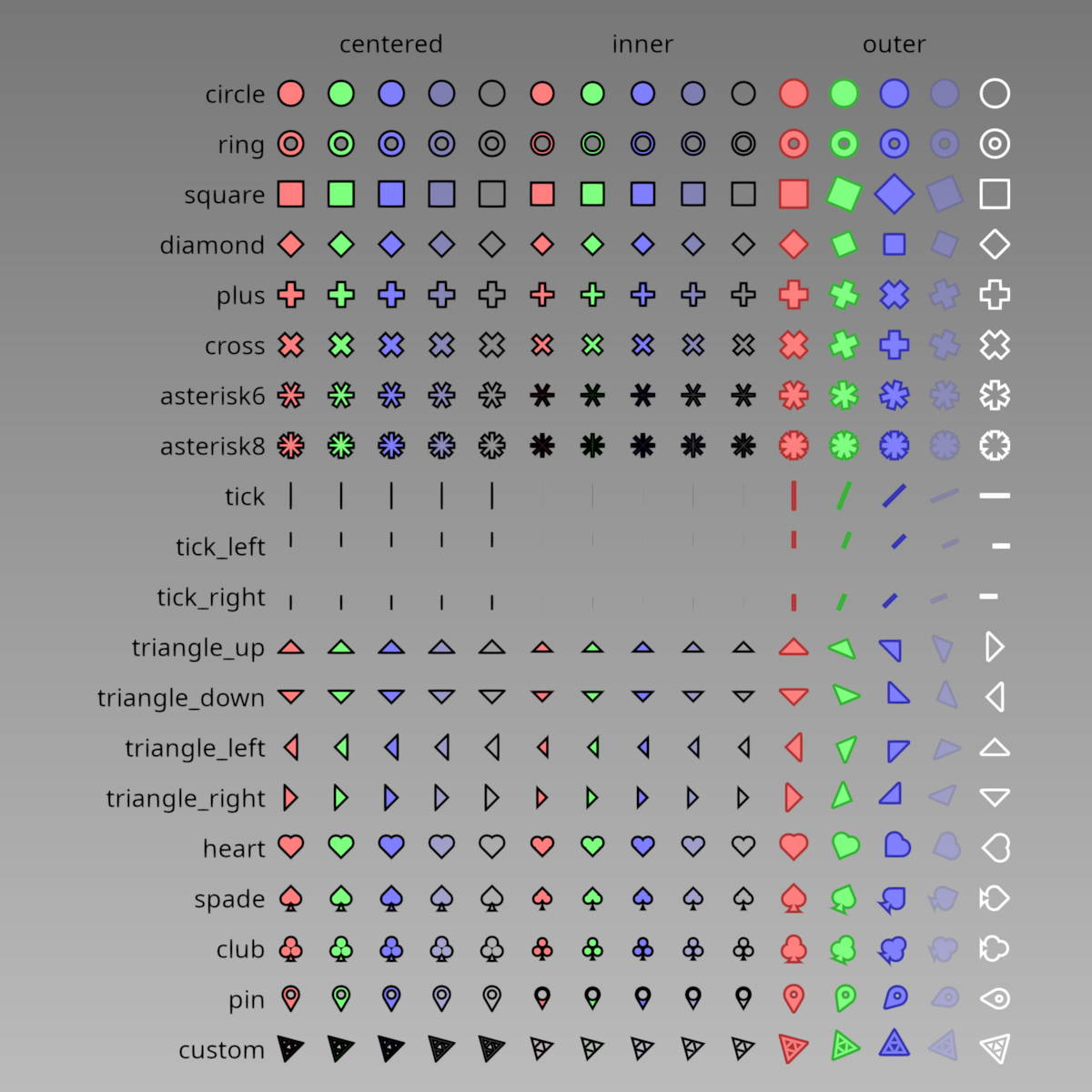
/home/docs/checkouts/readthedocs.org/user_builds/pygfx/checkouts/1273/examples/validation/validate_points_markers.py:75: DeprecationWarning: Setting the shape on a NumPy array has been deprecated in NumPy 2.5.
As an alternative, you can create a new view using np.reshape (with copy=False if needed).
  positions.shape = -1, 3
import numpy as np
from rendercanvas.auto import RenderCanvas, loop
import pygfx as gfx


canvas = RenderCanvas(size=(1200, 1200))
renderer = gfx.WgpuRenderer(canvas)


# Create small arrays

colors = np.array(
    [
        [1.0, 0.5, 0.5, 1.0],
        [0.5, 1.0, 0.5, 1.0],
        [0.5, 0.5, 1.0, 1.0],
        [0.5, 0.5, 1.0, 0.3],
        [0.0, 0.0, 0.0, 0.0],
    ],
    np.float32,
)
edge_colors = np.array(
    [
        [0.7, 0.2, 0.2, 1.0],
        [0.2, 0.7, 0.2, 1.0],
        [0.2, 0.2, 0.7, 1.0],
        [0.2, 0.2, 0.7, 0.3],
        [1.0, 1.0, 1.0, 1.0],
    ],
    np.float32,
)

# Rotate a quarter-circle to the right
rotations = np.linspace(0, -np.pi / 2, len(colors), dtype=np.float32)

markers = np.zeros(len(list(gfx.MarkerShape)), np.int32)
for i, marker_name in enumerate(gfx.MarkerShape):
    markers[i] = gfx.MarkerInt[marker_name]


# Repeat / tile the arrays

ncolors = len(colors)
nmarkers = len(markers)
npoints = ncolors * nmarkers

colors = colors.repeat(nmarkers, 0)
edge_colors = edge_colors.repeat(nmarkers, 0)
rotations = rotations.repeat(nmarkers)
markers = np.tile(markers, ncolors)


# Create positions

positions = np.zeros((ncolors, nmarkers, 3), np.float32)
positions[:, :, 0].flat = np.arange(ncolors).repeat(nmarkers) * 2
positions[:, :, 1] = -np.arange(1, nmarkers + 1) * 2
positions.shape = -1, 3

geometry = gfx.Geometry(
    positions=positions,
    colors=colors,
    edge_colors=edge_colors,
    rotations=rotations,
    markers=markers,
)


scene = gfx.Scene()
scene.add(gfx.Background.from_color("#bbb", "#777"))

pygfx_sdf = """
    let m_sqrt_3 = 1.7320508075688772;

    // coords uses WGSL coordinates.
    // we shift it so that the center of the triangle is at the origin.
    // for ease of calculations.
    var coord_for_sdf = coord / size + vec2<f32>(0.5, -0.5);

    // https://math.stackexchange.com/a/4073070
    // equilateral triangle has length of size
    //    sqrt(3) - 1
    let triangle_x = m_sqrt_3 - 1.;
    let one_minus_triangle_x = 2. - m_sqrt_3;
    let triangle_length = SQRT_2 * triangle_x;

    let pygfx_width = 0.10;

    let v1 = normalize(vec2<f32>(one_minus_triangle_x, 1));
    let r1_out = dot(coord_for_sdf, v1);
    let r1_in  = r1_out + pygfx_width;

    let v2 = normalize(vec2<f32>(-1, -one_minus_triangle_x));
    let r2_out = dot(coord_for_sdf, v2);
    let r2_in  = r2_out + pygfx_width;

    let v3 = normalize(vec2<f32>(triangle_x, -triangle_x));
    let r3_out = dot(coord_for_sdf - vec2(1, -one_minus_triangle_x), v3);
    let r3_in  = r3_out + pygfx_width;

    let inner_offset = 0.5 * (triangle_length - pygfx_width / 2.);
    let r1_out_blue = -r1_out - inner_offset;
    let r1_in_blue = r1_out_blue + pygfx_width;
    let r1_blue = max(
        max(r2_out, r3_in),
        max(r1_out_blue, -r1_in_blue)
    );

    let r2_out_blue = -r2_out - inner_offset;
    let r2_in_blue = r2_out_blue + pygfx_width;
    let r2_blue = max(
        max(r3_out, r1_in),
        max(r2_out_blue, -r2_in_blue)
    );

    let r3_out_blue = -r3_out - inner_offset;
    let r3_in_blue = r3_out_blue + pygfx_width;
    let r3_blue = max(
        max(r1_out, r2_in),
        max(r3_out_blue, -r3_in_blue)
    );

    let inner_triangle = min(r1_blue, min(r2_blue, r3_blue));

    let outer_triangle = max(
        max(r1_out, max(r2_out, r3_out)),
        -max(r1_in, max(r2_in, r3_in))
    );

    return min(inner_triangle, outer_triangle) * size;
"""


text = gfx.Text(
    text="centered",
    anchor="middle-center",
    font_size=1,
    material=gfx.TextMaterial("#000", aa=True),
)
text.local.x = ncolors
scene.add(text)

text = gfx.Text(
    text="inner",
    anchor="middle-center",
    font_size=1,
    material=gfx.TextMaterial("#000", aa=True),
)
text.local.x = 2 * ncolors + ncolors
scene.add(text)

text = gfx.Text(
    text="outer",
    anchor="middle-center",
    font_size=1,
    material=gfx.TextMaterial("#000", aa=True),
)
text.local.x = 4 * ncolors + ncolors
scene.add(text)

y = 0
for marker in gfx.MarkerShape:
    y += 2
    text = gfx.Text(
        text=marker,
        anchor="middle-right",
        font_size=1,
        material=gfx.TextMaterial("#000", aa=True),
    )
    text.local.y = -y
    text.local.x = 0
    scene.add(text)


all_points = []
points = gfx.Points(
    geometry,
    gfx.PointsMarkerMaterial(
        size=1,
        size_space="world",
        color_mode="vertex",
        marker_mode="vertex",
        # color_mode='debug',
        edge_color="#000",
        edge_width=0.1,
        custom_sdf=pygfx_sdf,
        aa=True,
    ),
)
points.local.x = 1
scene.add(points)
all_points.append(points)

points_inner = gfx.Points(
    geometry,
    gfx.PointsMarkerMaterial(
        size=1,
        size_space="world",
        color_mode="vertex",
        marker_mode="vertex",
        edge_color="#000",
        edge_width=0.1,
        edge_mode="inner",
        custom_sdf=pygfx_sdf,
        aa=True,
    ),
)
points_inner.local.x = 1 + 2 * ncolors
scene.add(points_inner)
all_points.append(points_inner)

points_outer = gfx.Points(
    geometry,
    gfx.PointsMarkerMaterial(
        size=1,
        size_space="world",
        color_mode="vertex",
        marker_mode="vertex",
        edge_color_mode="vertex",
        edge_width=0.1,
        edge_mode="outer",
        rotation_mode="vertex",
        custom_sdf=pygfx_sdf,
        aa=True,
    ),
)
points_outer.local.x = 1 + 4 * ncolors
scene.add(points_outer)
all_points.append(points_outer)


camera = gfx.OrthographicCamera()
camera.show_object(scene, scale=1.05, match_aspect=True)
controller = gfx.PanZoomController(camera, register_events=renderer)

canvas.request_draw(lambda: renderer.render(scene, camera))


@renderer.add_event_handler("key_down")
def handle_event(event):
    if event.key == "d":
        color_mode = "debug"
        for points in all_points:
            points.material.color_mode = color_mode
        print(f"color_mode {points.material.color_mode}")
    elif event.key == "v":
        color_mode = "vertex"
        for points in all_points:
            points.material.color_mode = color_mode
        print(f"color_mode {points.material.color_mode}")
    elif event.key == "j":
        for points in all_points:
            points.material.edge_width /= 1.1
        print(f"edge_width {points.material.edge_width}")
    elif event.key == "k":
        for points in all_points:
            points.material.edge_width *= 1.1
        print(f"edge_width {points.material.edge_width}")
    elif event.key == "r":
        for points in all_points:
            points.material.rotation += np.pi / 12
        geometry.rotations.data[...] += np.pi / 12
        geometry.rotations.update_full()
        print(f"rotation {points.material.rotation}")
    elif event.key == "R":
        for points in all_points:
            points.material.rotation -= np.pi / 12
        geometry.rotations.data[...] -= np.pi / 12
        geometry.rotations.update_full()
        print(f"rotation {points.material.rotation}")

    canvas.request_draw()


if __name__ == "__main__":
    print(__doc__)
    loop.run()
Total running time of the script: (0 minutes 1.607 seconds)
Gallery generated by Sphinx-Gallery
Interactive example
Try this example in your browser using Pyodide. Might not work with all examples and all devices. Check the output and your browser’s console for details.