Note
Go to the end to download the full example code.
Transparency 2
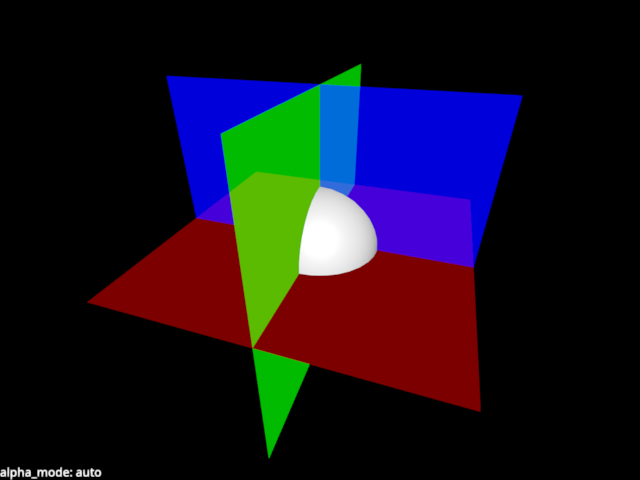
Example showing transparency using three orthogonal planes. This is a bit of an adversarial case because the planes are in the same position, plus they intersect, so sorting has no effect. In cases like this, the dither blending is king.
Press space to toggle the order of the planes. Press 1-7 to select the blending mode.
from rendercanvas.auto import RenderCanvas, loop
import pygfx as gfx
import pylinalg as la

canvas = RenderCanvas()
renderer = gfx.renderers.WgpuRenderer(canvas)
scene = gfx.Scene()

background = gfx.Background.from_color("#000")

sphere = gfx.Mesh(gfx.sphere_geometry(10), gfx.MeshPhongMaterial())

geometry = gfx.plane_geometry(50, 50, 10, 10)

plane1 = gfx.Mesh(geometry, gfx.MeshBasicMaterial(color="r", opacity=0.2))
plane2 = gfx.Mesh(geometry, gfx.MeshBasicMaterial(color="g", opacity=0.5))
plane3 = gfx.Mesh(geometry, gfx.MeshBasicMaterial(color="b", opacity=0.7))

plane1.local.rotation = la.quat_from_axis_angle((1, 0, 0), 1.571)
plane2.local.rotation = la.quat_from_axis_angle((0, 1, 0), 1.571)
plane3.local.rotation = la.quat_from_axis_angle((0, 0, 1), 1.571)

scene.add(background, plane1, plane2, plane3, sphere)

camera = gfx.PerspectiveCamera(70, 16 / 9)
camera.show_object(scene, view_dir=(-1, -2, -3))
controller = gfx.OrbitController(camera, register_events=renderer)

scene.add(camera.add(gfx.DirectionalLight()))

scene_overlay = gfx.Scene()
blend_text = gfx.Text(
    text=f"alpha_mode: {plane1.material.alpha_mode}",
    anchor="bottom-left",
    material=gfx.TextMaterial(outline_thickness=0.3, aa=True),
)
scene_overlay.add(blend_text)

screen_camera = gfx.ScreenCoordsCamera()


@renderer.add_event_handler("key_down")
def handle_event(event):
    canvas.request_draw()
    if event.key == " ":
        print("Rotating scene element order")
        scene.add(scene.children[1])  # skip bg
    elif event.key == ".":
        clr = "#fff" if background.material.color_bottom_left == "#000" else "#000"
        print(f"Changing background color to {clr}")
        background.material.set_colors(clr)
    elif event.key in "1234567":
        m = [
            None,
            "auto",  # 1
            "solid",  # 2
            "blend",  # 3
            "add",  # 4
            "dither",  # 5
            "bayer",  # 6
            "weighted_blend",  # 7
        ]
        alpha_mode = m[int(event.key)]
        for plane in plane1, plane2, plane3:
            plane.material.alpha_mode = alpha_mode
        print("Selecting alpha_mode", alpha_mode)
        blend_text.set_text(f"alpha_mode: {alpha_mode}")
    canvas.request_draw()


def animate():
    renderer.render(scene, camera, flush=False)
    renderer.render(
        scene_overlay,
        screen_camera,
        flush=True,
    )


if __name__ == "__main__":
    print(__doc__)
    canvas.request_draw(animate)
    loop.run()
Total running time of the script: (0 minutes 0.260 seconds)
Gallery generated by Sphinx-Gallery
Interactive example
Try this example in your browser using Pyodide. Might not work with all examples and all devices. Check the output and your browser’s console for details.