Note
Go to the end to download the full example code.
Transparency 1
Example showing transparency using three overlapping planes. The normal blending can produce correct results by sorting the objects in z.
Press space to toggle the order of the planes. Press 1-7 to select the blending mode.
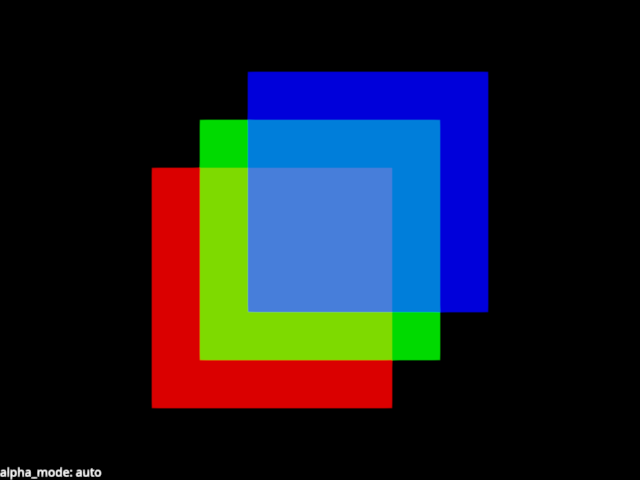
from rendercanvas.auto import RenderCanvas, loop
import pygfx as gfx


canvas = RenderCanvas()
renderer = gfx.renderers.WgpuRenderer(canvas)
scene = gfx.Scene()

background = gfx.Background.from_color("#000")

geometry = gfx.plane_geometry(50, 50)

# Note: marking the material as transparent, so the renderer sorts the objects
# by depth in the correct way. It also implicitly sets depth_write to False.
plane1 = gfx.Mesh(
    geometry,
    gfx.MeshBasicMaterial(color=(1, 0, 0, 0.7)),
)
plane2 = gfx.Mesh(
    geometry,
    gfx.MeshBasicMaterial(color=(0, 1, 0, 0.7)),
)
plane3 = gfx.Mesh(
    geometry,
    gfx.MeshBasicMaterial(color=(0, 0, 1, 0.7)),
)

plane1.local.position = (-10, -10, 1)
plane2.local.position = (0, 0, 2)
plane3.local.position = (10, 10, 3)

scene.add(background, plane1, plane2, plane3)

camera = gfx.OrthographicCamera(100, 100)

scene_overlay = gfx.Scene()

blend_text = gfx.Text(
    text=f"alpha_mode: {plane1.material.alpha_mode}",
    anchor="bottom-left",
    material=gfx.TextMaterial(outline_thickness=0.3, aa=True),
)
scene_overlay.add(blend_text)

screen_camera = gfx.ScreenCoordsCamera()

controller = gfx.OrbitController(camera, register_events=renderer)


@renderer.add_event_handler("key_down")
def handle_event(event):
    canvas.request_draw()
    if event.key == " ":
        print("Rotating scene element order")
        scene.add(scene.children[1])  # skip bg
    elif event.key == ".":
        clr = "#fff" if background.material.color_bottom_left == "#000" else "#000"
        print(f"Changing background color to {clr}")
        background.material.set_colors(clr)
    elif event.key in "1234567":
        m = [
            None,
            "auto",  # 1
            "solid",  # 2
            "blend",  # 3
            "add",  # 4
            "dither",  # 5
            "bayer",  # 6
            "weighted_blend",  # 7
        ]
        alpha_mode = m[int(event.key)]
        for plane in plane1, plane2, plane3:
            plane.material.alpha_mode = alpha_mode
        print("Selecting blending", alpha_mode)
        blend_text.set_text(f"alpha_mode: {alpha_mode}")


def animate():
    renderer.render(scene, camera, flush=False)
    renderer.render(scene_overlay, screen_camera, flush=True)


if __name__ == "__main__":
    print(__doc__)
    canvas.request_draw(animate)
    loop.run()
Total running time of the script: (0 minutes 0.169 seconds)
Gallery generated by Sphinx-Gallery
Interactive example
Try this example in your browser using Pyodide. Might not work with all examples and all devices. Check the output and your browser’s console for details.