Note
Go to the end to download the full example code.
Validate Colormap
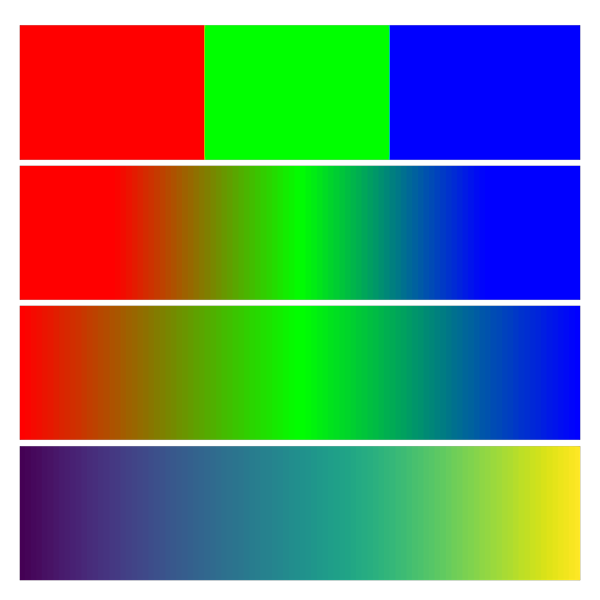
Show an image with four different colormaps.
The first (top) one is a colormap consisting of 3 values, interpolated with nearest neighbours. E.g. to denote categories.
The next one uses the same colormap, interpolated linearly. One can see how this causes the colors near the edges of the image to not show a gradient.
In the next image the same transition (from red to green to blue) is shown with a colormap of 256 values.
The bottom image shows the standard Viridis colormap.
import numpy as np
from rendercanvas.auto import RenderCanvas, loop
import pygfx as gfx


renderer = gfx.renderers.WgpuRenderer(RenderCanvas(size=(600, 600)))

im = np.repeat(np.linspace(0, 1, 100).reshape(1, -1), 24, 0).astype(np.float32)
geometry = gfx.Geometry(grid=gfx.Texture(im, dim=2))


colormap_data1 = np.array([[1, 0, 0], [0, 1, 0], [0, 0, 1]], np.float32)

colormap_data2 = np.zeros((256, 3), np.float32)
colormap_data2[0:128, 0] = np.linspace(1, 0, 128)
colormap_data2[0:128, 1] = np.linspace(0, 1, 128)
colormap_data2[128:, 1] = np.linspace(1, 0, 128)
colormap_data2[128:, 2] = np.linspace(0, 1, 128)

colormap1 = gfx.Texture(colormap_data1, dim=1)
colormap2 = gfx.Texture(colormap_data2, dim=1)


image1 = gfx.Image(
    geometry,
    gfx.ImageBasicMaterial(
        clim=(0, 1),
        map=gfx.TextureMap(
            colormap1,
            filter="nearest",
            wrap="clamp",
        ),
    ),
)
image1.local.y = 75

image2 = gfx.Image(
    geometry,
    gfx.ImageBasicMaterial(
        clim=(0, 1),
        map=gfx.TextureMap(
            colormap1,
            filter="linear",
            wrap="clamp",
        ),
    ),
)
image2.local.y = 50

image3 = gfx.Image(
    geometry,
    gfx.ImageBasicMaterial(
        clim=(0, 1),
        map=gfx.TextureMap(
            colormap2,
            filter="nearest",
            wrap="clamp",
        ),
    ),
)
image3.local.y = 25

image4 = gfx.Image(
    geometry,
    gfx.ImageBasicMaterial(
        clim=(0, 1),
        map=gfx.cm.viridis,
    ),
)
image4.local.y = 0

scene = gfx.Scene()
scene.add(image1, image2, image3, image4)

camera = gfx.OrthographicCamera()
camera.show_rect(-4, 103, -4, 103)

renderer.request_draw(lambda: renderer.render(scene, camera))


if __name__ == "__main__":
    print(__doc__)
    loop.run()
Total running time of the script: (0 minutes 0.292 seconds)
Gallery generated by Sphinx-Gallery
Interactive example
Try this example in your browser using Pyodide. Might not work with all examples and all devices. Check the output and your browser’s console for details.