Note
Go to the end to download the full example code.
Normals on front and back
This example validates that normals are handled such that both the front and back faces are lit. Further it validates the appearance of the normal lines material.
This shows a flattened cylinder, with normal lines sticking out both at the front and back faces.
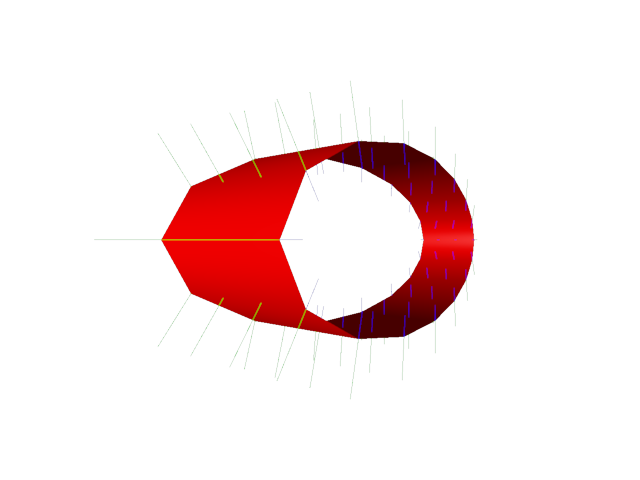
from rendercanvas.auto import RenderCanvas, loop
import pygfx as gfx
import pylinalg as la


renderer = gfx.WgpuRenderer(RenderCanvas())
scene = gfx.Scene()

geo = gfx.cylinder_geometry(radial_segments=16, height_segments=3, open_ended=True)
ob1 = gfx.Mesh(
    geo,
    gfx.MeshPhongMaterial(color="#f00"),
)
ob2 = gfx.Mesh(
    geo,
    gfx.MeshNormalLinesMaterial(color="#0f0", line_length=0.4),
)
ob3 = gfx.Mesh(
    geo,
    gfx.MeshNormalLinesMaterial(color="#00f", line_length=-0.2),
)

ob1.local.position = (1, 0, 0)
ob1.local.rotation = la.quat_from_axis_angle((0, 1, 0), 1)
ob1.local.scale = (3, 1, 1)
scene.add(ob1.add(ob2, ob3))

scene.add(gfx.DirectionalLight(), gfx.AmbientLight())

camera = gfx.PerspectiveCamera(70, 1, depth_range=(0.1, 2000))
camera.local.z = 4.5

renderer.request_draw(lambda: renderer.render(scene, camera))


if __name__ == "__main__":
    print(__doc__)
    loop.run()
Total running time of the script: (0 minutes 0.279 seconds)
Gallery generated by Sphinx-Gallery
Interactive example
Try this example in your browser using Pyodide. Might not work with all examples and all devices. Check the output and your browser’s console for details.