Note
Go to the end to download the full example code.
Infinite line segments
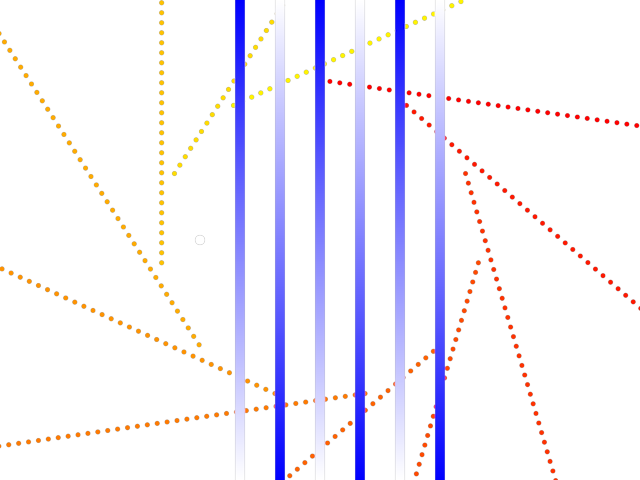
Display infinite line segments.
import numpy as np
from rendercanvas.auto import RenderCanvas, loop
import pygfx as gfx


canvas = RenderCanvas()
renderer = gfx.WgpuRenderer(canvas)

scene = gfx.Scene()

# Create an even number of positions in a circle
t = np.linspace(0, 2 * np.pi, 22, endpoint=False, dtype=np.float32)
x = np.sin(t) * 4
y = np.cos(t) * 4
positions1 = np.column_stack([x, y, np.zeros_like(x)])

# More positions
positions2 = np.array(
    [
        [-3, 0, 1],  # Two points in the same position stay a single point
        [-3, 0, 1],
        [-2, -100, 1],  # A vertical line, below viewport
        [-2, -101, 1],
        [-1, -101, 1],  # A vertical line, dito
        [-1, -100, 1],
        [0, 101, 1],  # A vertical line, above viewport
        [0, 100, 1],
        [1, 100, 1],  # A vertical line
        [1, 101, 1],
        [2, 3.01, 1],  # A shot line
        [2, 3.00, 1],
        [3, 3.00, 1],  # A shot line
        [3, 3.01, 1],
    ],
    np.float32,
)


# Assign color to the different line segments
colors1 = np.zeros_like(positions1)
colors1[:, 0] = 1
colors1[:, 1] = np.linspace(0, 1, len(colors1))

colors2 = np.ones_like(positions2)
colors2[2::2, :] = 0, 0, 1

line1 = gfx.Line(
    gfx.Geometry(positions=positions1, colors=colors1),
    gfx.LineInfiniteSegmentMaterial(
        thickness=5.0,
        color_mode="face",
        start_is_infinite=False,
        dash_pattern=[0, 2],
        aa=True,
    ),
)
scene.add(line1)

line2 = gfx.Line(
    gfx.Geometry(positions=positions2, colors=colors2),
    gfx.LineInfiniteSegmentMaterial(
        thickness=10, end_is_infinite=1, color_mode="vertex", aa=True
    ),
)
scene.add(line2)

camera = gfx.OrthographicCamera(12, 12, maintain_aspect=True)
controller = gfx.PanZoomController(camera, register_events=renderer)

canvas.request_draw(lambda: renderer.render(scene, camera))


if __name__ == "__main__":
    print(__doc__)
    loop.run()
Total running time of the script: (0 minutes 0.548 seconds)
Gallery generated by Sphinx-Gallery
Interactive example
Try this example in your browser using Pyodide. Might not work with all examples and all devices. Check the output and your browser’s console for details.