Note
Go to the end to download the full example code.
Line loop
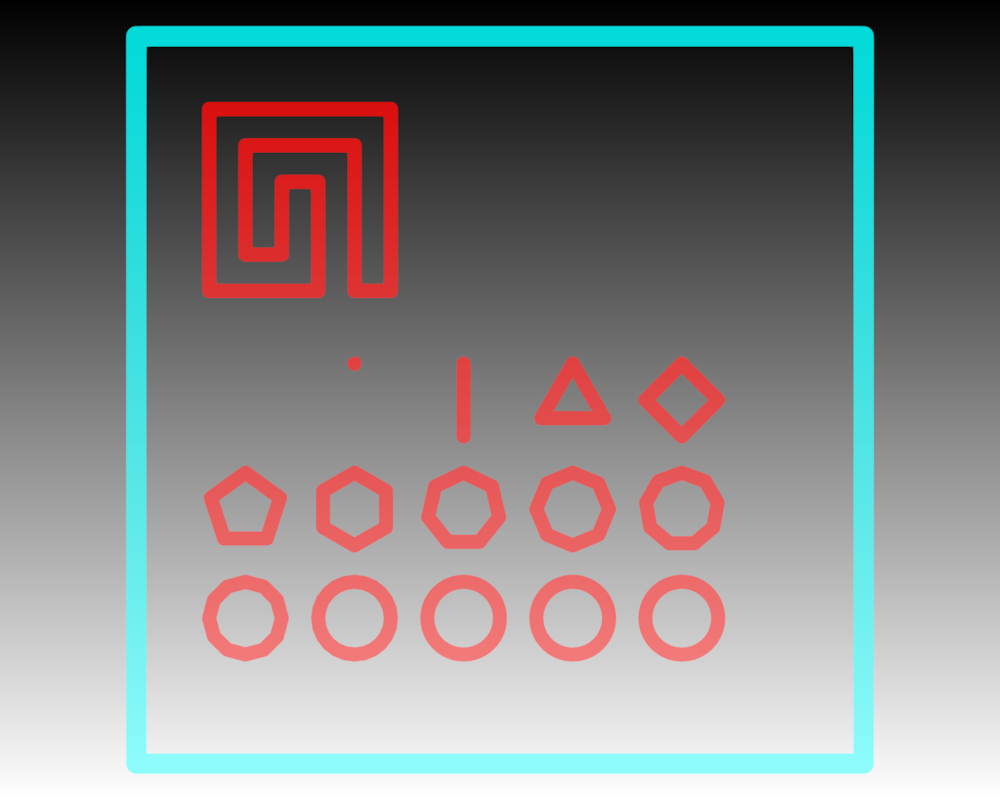
Drawing multiple line loops using material.loop and separating line-pieces with nans.
import numpy as np
from rendercanvas.auto import RenderCanvas, loop
import pygfx as gfx


canvas = RenderCanvas(size=(1000, 800))
renderer = gfx.WgpuRenderer(canvas)
scene = gfx.Scene()

# This example ensures there are no visual artifacts with transparent lines
# for closed loops. Add a background to help demonstrate that.
scene.add(gfx.Background.from_color("#fff", "#000"))


def circle(n, x=0, y=0):
    t = np.linspace(0, 2 * np.pi, n, endpoint=False)
    return np.stack([x + np.sin(t), y + np.cos(t), np.zeros_like(t)], axis=1)


nanpoint = np.full((1, 3), np.nan, dtype="f4")
rect_points = np.array([[-1, -1, 0], [-1, +1, 0], [+1, +1, 0], [+1, -1, 0]], "f4")

# This line-piece has all straight corners. It covers the fix for a
# bug wherer 90 degree corner, aligned with the coordinate frame,
# resulted in a glitch in the line join.
all_corners = np.array(
    [
        [0, 0, 0],
        [0, 1, 0],
        [1, 1, 0],
        [1, 0, 0],
        [0.8, 0, 0],
        [0.8, 0.8, 0],
        [0.2, 0.8, 0],
        [0.2, 0.2, 0],
        [0.4, 0.2, 0],
        [0.4, 0.6, 0],
        [0.6, 0.6, 0],
        [0.6, 0, 0],
    ],
    "f4",
)
all_corners *= 5
all_corners += (-8, 3, 0)


positions = np.vstack(
    [
        # Special case
        all_corners,
        nanpoint,
        # Increasingly more corners
        circle(0, -7, 0),  # actuall zero points, so two successive nanpoints
        nanpoint,
        circle(1, -4, 0),
        nanpoint,
        circle(2, -1, 0),
        nanpoint,
        circle(3, +2, 0),
        nanpoint,
        nanpoint,  # ensure 2 successive nanpoints don't crash the shader
        nanpoint,
        circle(4, +5, 0),
        nanpoint,
        # Even more corners
        circle(5, -7, -3),
        nanpoint,
        nanpoint,  # ensure many successive nanpoints don't crash the shader
        nanpoint,
        nanpoint,
        nanpoint,
        nanpoint,
        circle(6, -4, -3),
        nanpoint,
        circle(7, -1, -3),
        nanpoint,
        circle(8, +2, -3),
        nanpoint,
        circle(9, +5, -3),
        nanpoint,
        # These become circles
        circle(12, -7, -6),
        nanpoint,
        circle(24, -4, -6),
        nanpoint,
        circle(48, -1, -6),
        nanpoint,
        circle(96, +2, -6),
        nanpoint,
        circle(192, +5, -6),
        # nanpoint,  # optional
    ],
    dtype="f4",
)

line1 = gfx.Line(
    gfx.Geometry(positions=positions),
    gfx.LineMaterial(
        thickness=14, color="red", alpha_mode="blend", opacity=0.7, loop=True, aa=True
    ),
)
scene.add(line1)


line2 = gfx.Line(
    gfx.Geometry(positions=rect_points * 10),
    gfx.LineMaterial(
        thickness=20, color="cyan", alpha_mode="blend", opacity=0.7, loop=True, aa=True
    ),
)
scene.add(line2)

camera = gfx.OrthographicCamera(500, 500)
camera.show_object(scene, match_aspect=True, scale=1.1)
controller = gfx.PanZoomController(camera, register_events=renderer)


canvas.request_draw(lambda: renderer.render(scene, camera))

if __name__ == "__main__":
    print(__doc__)
    loop.run()
Total running time of the script: (0 minutes 0.663 seconds)
Gallery generated by Sphinx-Gallery
Interactive example
Try this example in your browser using Pyodide. Might not work with all examples and all devices. Check the output and your browser’s console for details.