Note
Go to the end to download the full example code.
srgb texture colorspace
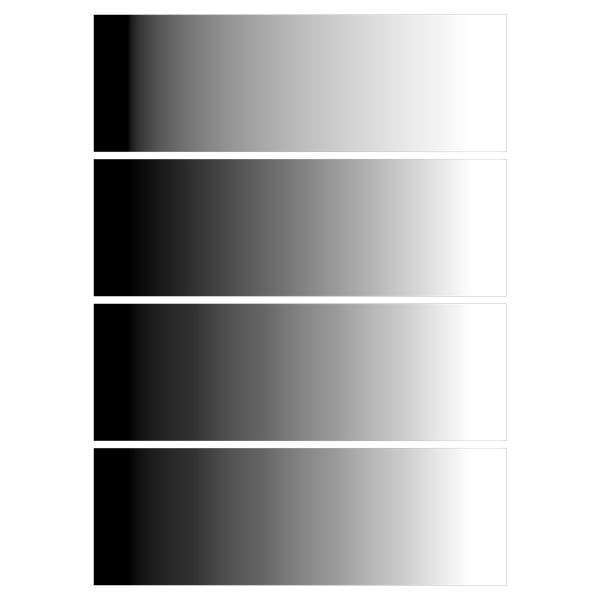
Show images with physical colorspace, and srgb colorspace via three methods.
The top image shows physical colorspace, very non-linear.
The 2nd shows srgb colorspace, interpolated in srgb (srgb-to-linear happens in shader).
The 3d shows srgb texture, interpolated in linear space (srgb-to-linear is automatic).
The 4th is the same, using an explicit texture format.
/home/docs/checkouts/readthedocs.org/user_builds/pygfx/checkouts/1273/examples/validation/validate_srgb.py:24: DeprecationWarning: Setting the shape on a NumPy array has been deprecated in NumPy 2.5.
As an alternative, you can create a new view using np.reshape (with copy=False if needed).
  rgba.shape = (*rgba.shape, 1)
import numpy as np
from rendercanvas.auto import RenderCanvas, loop
import pygfx as gfx


renderer = gfx.renderers.WgpuRenderer(RenderCanvas(size=(600, 600)))

rgba = np.repeat(np.linspace(0, 255, 6).reshape(1, -1), 2, 0).astype(np.uint8)
rgba.shape = (*rgba.shape, 1)
rgba = np.repeat(rgba, 4, 2)
rgba[:, :, 3] = 255
rgb = rgba[:, :, :3].copy()


material = gfx.ImageBasicMaterial(clim=(0, 255), interpolation="linear")

image1 = gfx.Image(
    gfx.Geometry(grid=gfx.Texture(rgb, dim=2, colorspace="physical")),
    material,
)

image2 = gfx.Image(
    gfx.Geometry(grid=gfx.Texture(rgb, dim=2, colorspace="srgb")),
    material,
)
image2.local.y = 2.1

image3 = gfx.Image(
    gfx.Geometry(grid=gfx.Texture(rgb, dim=2, colorspace="tex-srgb")),
    material,
)
image3.local.y = 4.2

# Use explicit format. We still need to set the colorspace, otherwise it converts twice.
# Pygfx will catch and warn for this case.
image4 = gfx.Image(
    gfx.Geometry(
        grid=gfx.Texture(rgba, dim=2, colorspace="tex-srgb", format="rgba8unorm-srgb")
    ),
    material,
)
image4.local.y = 6.3

scene = gfx.Scene()
scene.add(image1, image2, image3, image4)

camera = gfx.OrthographicCamera()
camera.local.scale_y = -1
camera.show_object(scene, match_aspect=True, scale=1.05)

renderer.request_draw(lambda: renderer.render(scene, camera))


if __name__ == "__main__":
    loop.run()
Total running time of the script: (0 minutes 0.259 seconds)
Gallery generated by Sphinx-Gallery
Interactive example
Try this example in your browser using Pyodide. Might not work with all examples and all devices. Check the output and your browser’s console for details.