Note
Go to the end to download the full example code.
Depth Clipping
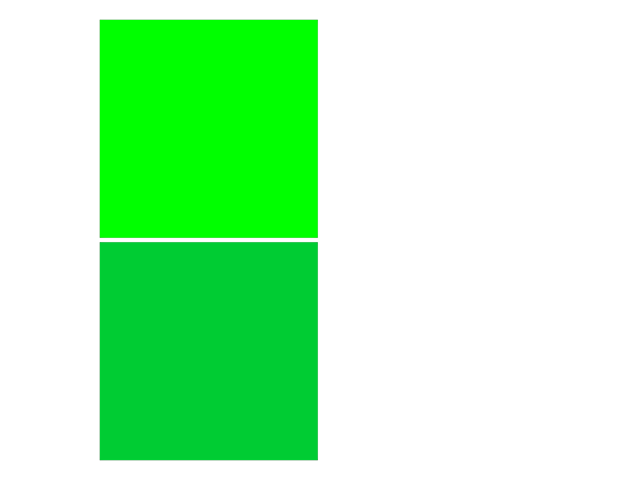
Example (and test) for camera depth clipping planes. This draws four rectangles near the near and far clipping planes.
Only the two green ones should be visible.
The greener square should be in the upper-left.
from rendercanvas.auto import RenderCanvas, loop
import pygfx as gfx


canvas = RenderCanvas()
renderer = gfx.renderers.WgpuRenderer(canvas)
scene = gfx.Scene()


# Select near, far, and camera

# With the ortho camera, you can pick any values you like, also negative
# near values. With the perspective camera you'll want to pick a small
# positive near-value, and a relatively small value for the far-value
# as well, otherwise the distant squares become smaller than 1 pixel ;)

# Select camera and matchingclipping planes
if True:
    near, far = -40, 300
    camera = gfx.OrthographicCamera(2.2, 2.2, depth_range=(near, far))
else:
    near, far = 5, 10
    camera = gfx.PerspectiveCamera(50, 1, depth_range=(near, far))


# Create four planes near the z-clipping planes

geometry = gfx.plane_geometry(1, 1)
green_material = gfx.MeshBasicMaterial(color=(0, 0.8, 0.2, 1))
greener_material = gfx.MeshBasicMaterial(color=(0, 1, 0, 1))
red_material = gfx.MeshBasicMaterial(color=(1, 0, 0, 1))

plane1 = gfx.Mesh(geometry, green_material)
plane2 = gfx.Mesh(geometry, red_material)
plane3 = gfx.Mesh(geometry, greener_material)
plane4 = gfx.Mesh(geometry, red_material)

# Note the negation of near and far in the plane's position. This is
# because the camera looks down the z-axis: more negative means moving
# away from the camera, positive values are behind the camera.
plane1.local.position = (-0.51, -0.51, -(near + 0.01))  # in range
plane2.local.position = (+0.51, -0.51, -(near - 0.01))  # out range
plane3.local.position = (-0.51, +0.51, -(far - 0.01))  # in range
plane4.local.position = (+0.51, +0.51, -(far + 0.01))  # out range

for plane in (plane1, plane2, plane3, plane4):
    scene.add(plane)

canvas.request_draw(lambda: renderer.render(scene, camera))

if __name__ == "__main__":
    print(__doc__)
    loop.run()
Total running time of the script: (0 minutes 0.138 seconds)
Gallery generated by Sphinx-Gallery
Interactive example
Try this example in your browser using Pyodide. Might not work with all examples and all devices. Check the output and your browser’s console for details.