Note
Go to the end to download the full example code.
Validate view offset
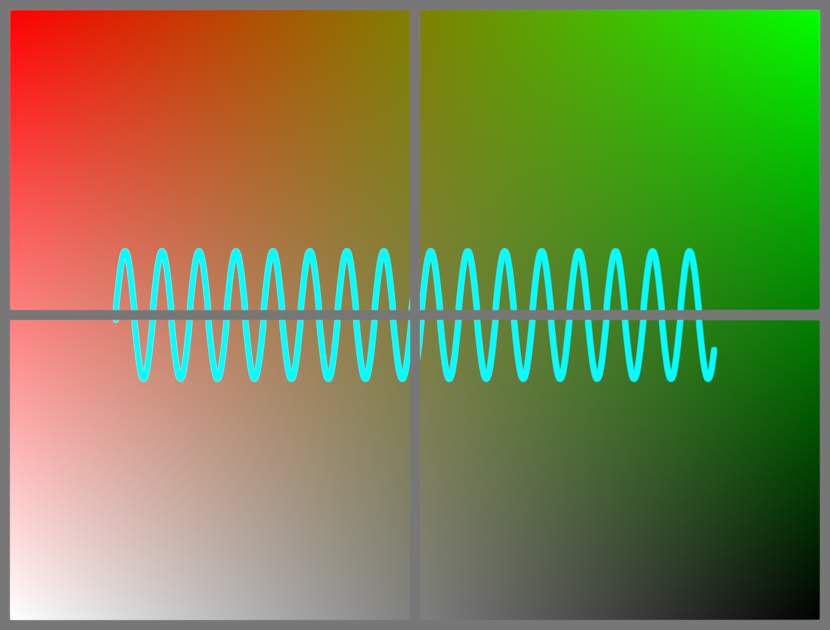
This renders a sine wave on a gradient background. But the four
quadrants are rendered separately using set_view_offset and put
together using textured gfx.Mesh objects with a margin in between.
The offscreen canvas has a pixel-ratio of 2, and the line has a thickness (in logical pixels), so this should cover the sizing logic.
import numpy as np
from rendercanvas.offscreen import RenderCanvas as OffscreenCanvas
from rendercanvas.auto import RenderCanvas, loop
import pygfx as gfx


# -- Prepare canvases

pixel_ratio = 2
offscreen_canvas = OffscreenCanvas(size=(400, 300), pixel_ratio=pixel_ratio)
canvas = RenderCanvas(size=(830, 630))


# -- scene that renders the visualization

renderer1 = gfx.WgpuRenderer(offscreen_canvas)

scene1 = gfx.Scene()
scene1.add(gfx.Background.from_color("#fff", "#000", "#f00", "#0f0"))

x = np.linspace(0, 100, 1000, dtype=np.float32)
y = np.sin(x) * 10
line = gfx.Line(
    gfx.Geometry(positions=np.vstack((x, y, np.zeros_like(x))).T),
    gfx.LineMaterial(color="#0ff", thickness=6, aa=False),
)
scene1.add(line)

camera1 = gfx.OrthographicCamera()
camera1.show_object(scene1)


# -- The scene to show the tiles

renderer2 = gfx.WgpuRenderer(canvas)

scene2 = gfx.Scene()
scene2.add(gfx.Background.from_color("#777"))

tile_shape = pixel_ratio * 300, pixel_ratio * 400, 4
tile1 = gfx.Texture(np.zeros(tile_shape, np.uint8), dim=2)
tile2 = gfx.Texture(np.zeros(tile_shape, np.uint8), dim=2)
tile3 = gfx.Texture(np.zeros(tile_shape, np.uint8), dim=2)
tile4 = gfx.Texture(np.zeros(tile_shape, np.uint8), dim=2)

image_material = gfx.ImageBasicMaterial(clim=(0, 255))

mesh1 = gfx.Mesh(gfx.plane_geometry(400, 300), gfx.MeshBasicMaterial(map=tile1))
mesh2 = gfx.Mesh(gfx.plane_geometry(400, 300), gfx.MeshBasicMaterial(map=tile2))
mesh3 = gfx.Mesh(gfx.plane_geometry(400, 300), gfx.MeshBasicMaterial(map=tile3))
mesh4 = gfx.Mesh(gfx.plane_geometry(400, 300), gfx.MeshBasicMaterial(map=tile4))

mesh1.local.position = 200 + 10, 150 + 320, 0
mesh2.local.position = 200 + 420, 150 + 320, 0
mesh3.local.position = 200 + 10, 150 + 10, 0
mesh4.local.position = 200 + 420, 150 + 10, 0

scene2.add(mesh1, mesh2, mesh3, mesh4)

camera2 = gfx.OrthographicCamera()
camera2.show_rect(0, 830, 0, 630)


# -- Tiling


@offscreen_canvas.request_draw
def animate1():
    renderer1.render(scene1, camera1)


# so in the current situation with run_sync and rendercanvas (2.6.2) having the two draw functions (which in turn call sync_waited promises somewhere) causes a problem with Pyodide.
# my suspicion is that only a single loop exist and the innermost run_sync doesn't even block anymore. I will try to recreate this behaviour in pure renderdoc(no pygfx, no wgpu-py) to maybe understand it better.
# calling this function once instead of adding it to the loop does work... but this means the loop doesn't actually do anything and can be ommited.
# In short: the outer canvas draw function includes calls to ofscreen_canvas.draw, and if called as as a request_draw from the loop, breaks


# @canvas.request_draw # don't register in the loop
def animate2():
    camera1.set_view_offset(800, 600, 0, 0, 400, 300)
    im = offscreen_canvas.draw()
    im = np.asarray(im)
    tile1.set_data(im)

    camera1.set_view_offset(800, 600, 400, 0, 400, 300)
    im = offscreen_canvas.draw()
    tile2.set_data(im)

    camera1.set_view_offset(800, 600, 0, 300, 400, 300)
    im = offscreen_canvas.draw()
    tile3.set_data(im)

    camera1.set_view_offset(800, 600, 400, 300, 400, 300)
    im = offscreen_canvas.draw()
    tile4.set_data(im)

    renderer2.render(scene2, camera2)


renderer = renderer2  # for the screenshot code

if __name__ == "__main__":
    print(__doc__)
    # call once instead of a loop
    animate2()
    # loop.run()
Total running time of the script: (0 minutes 0.766 seconds)
Gallery generated by Sphinx-Gallery
Interactive example
Try this example in your browser using Pyodide. Might not work with all examples and all devices. Check the output and your browser’s console for details.