Note
Go to the end to download the full example code.
Tiny Image Validation
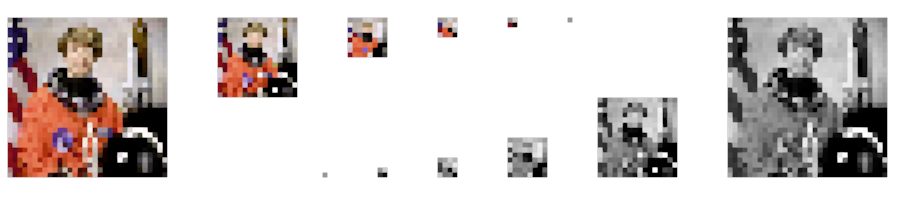
This example shows the ability to render different images of small sizes from 32x32 to 1x1 pixels in both RGB and grayscale formats.
1x1 pixel images might seem strange but can occurs in algorithm development where the applicability of an algorithm is tested against extreme bounds.
import numpy as np
import imageio.v3 as iio
from rendercanvas.auto import RenderCanvas, loop
import pygfx as gfx


canvas = RenderCanvas(size=(180 * 5, 40 * 5))
renderer = gfx.renderers.WgpuRenderer(canvas)
scene = gfx.Scene()
camera = gfx.OrthographicCamera(180, 40)
camera.local.y = 16
camera.local.scale_y = -1
camera.local.x = 176 / 2

astronaut = iio.imread("imageio:astronaut.png")
# astronaut is a 512x512 image, resize it to 32x32
# anti-aliasing is bad, but it shows funny effects too!
astronaut_32x32 = astronaut[::16, ::16]
astronaut_32x32_grayscale = np.sum(
    np.asarray([1.0, 1.0, 1.0]) / 3 * astronaut_32x32,
    axis=-1,
).astype(np.uint8)

position_rgb = 0
position_gray = 176
for i in [
    32,
    16,
    8,
    4,
    2,
    1,
]:
    image_rgb = astronaut_32x32[:: 32 // i, :: 32 // i]
    image_gfx = gfx.Image(
        gfx.Geometry(grid=gfx.Texture(image_rgb, dim=2)),
        gfx.ImageBasicMaterial(clim=(0, 255)),
    )
    image_gfx.local.x = position_rgb
    position_rgb += i + 10
    scene.add(image_gfx)

    image_gray = astronaut_32x32_grayscale[:: 32 // i, :: 32 // i]
    image_gfx = gfx.Image(
        gfx.Geometry(grid=gfx.Texture(image_gray, dim=2)),
        gfx.ImageBasicMaterial(clim=(0, 255)),
    )
    image_gfx.local.x = position_gray - i
    image_gfx.local.y = 32 - i
    scene.add(image_gfx)
    position_gray -= i + 10

canvas.request_draw(lambda: renderer.render(scene, camera))

if __name__ == "__main__":
    print(__doc__)
    loop.run()
Total running time of the script: (0 minutes 0.289 seconds)
Gallery generated by Sphinx-Gallery
Interactive example
Try this example in your browser using Pyodide. Might not work with all examples and all devices. Check the output and your browser’s console for details.