Note
Go to the end to download the full example code.
Blending ordered2
The ‘ordered2’ was a previously supported blend mode (when blending as defined on the renderer). This example mimics it’s behaviour.
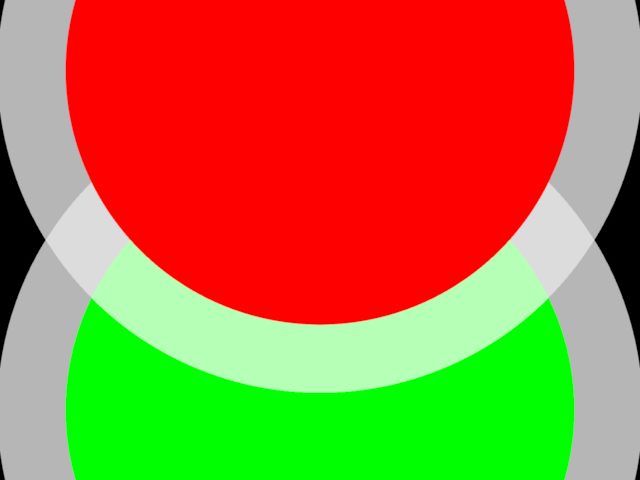
This example draws a red (top) and a green (bottom) circle. The circles are opaque but have a transparent edge. I.e. the objects have both opaque and transparent fragments, which is a case that easily results in wrong blending.
We deliberately cause wrong blending: the green circle is drawn after the red one, but it is also behind the red one. This means that without proper care, the edge of the red circle hides the green circle.
By first rendering only the opaque fragments, and then rendering the transparent fragments, this can be fixed. To do this, we use the alpha test.
from rendercanvas.auto import RenderCanvas, loop
import pygfx as gfx


canvas = RenderCanvas()
renderer = gfx.WgpuRenderer(canvas)
scene = gfx.Scene()

scene.add(gfx.Background.from_color("#000"))

points1 = gfx.Points(
    gfx.Geometry(positions=[[0, 0, 0]]),
    gfx.PointsMarkerMaterial(
        size_space="model",
        edge_mode="outer",
        size=1.5,
        edge_width=0.2,
        color="#f00",
        edge_color="#fff7",
    ),
)
scene.add(points1)

points2 = gfx.Points(
    gfx.Geometry(positions=[[0, -1, -1]]),
    gfx.PointsMarkerMaterial(
        size_space="model",
        edge_mode="outer",
        size=1.5,
        edge_width=0.2,
        color="#0f0",
        edge_color="#fff7",
    ),
)
scene.add(points2)

camera = gfx.PerspectiveCamera(0)
camera.show_object(scene)


def clone(ob):
    # Pygfx does not have a method to clone an object/material yet,
    # so we do a cruder version.
    # See https://github.com/pygfx/pygfx/issues/1095
    keys = ["size_space", "edge_mode", "size", "edge_width", "color", "edge_color"]
    props = {key: getattr(ob.material, key) for key in keys}
    material = type(ob.material)(**props)
    return type(ob)(ob.geometry, material)


def make_object_ordered2(ob1):
    ob2 = clone(ob1)

    # The original object is used to draw only opaque fragments (alpha == 1)
    ob1.material.alpha_mode = "solid"
    ob1.material.alpha_test = 0.999
    ob1.material.alpha_compare = "<"

    # The clone is used to draw only transparent fragments (alpha < 1)
    ob2.material.alpha_mode = "blend"
    ob2.material.alpha_test = 0.999
    ob2.material.alpha_compare = ">="

    ob1.add(ob2)


# Comment these lines to see the normal (but wrong) blending
make_object_ordered2(points1)
make_object_ordered2(points2)


canvas.request_draw(lambda: renderer.render(scene, camera))

if __name__ == "__main__":
    loop.run()
Total running time of the script: (0 minutes 0.381 seconds)
Gallery generated by Sphinx-Gallery
Interactive example
Try this example in your browser using Pyodide. Might not work with all examples and all devices. Check the output and your browser’s console for details.