Note
Go to the end to download the full example code.
Volume Rendering 2
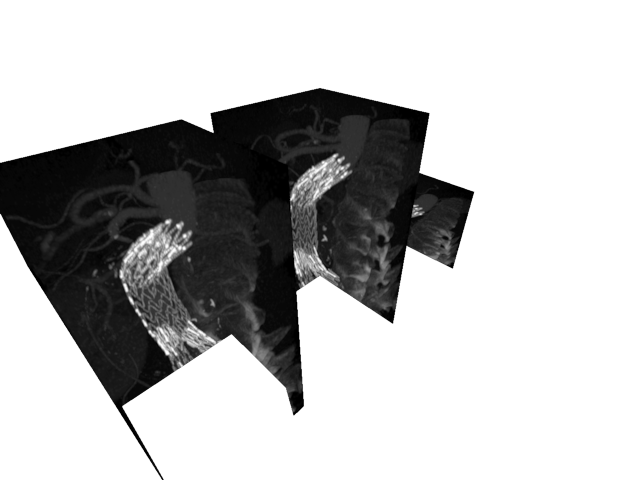
Render three volumes using different world transforms.
import imageio.v3 as iio
import numpy as np
from rendercanvas.auto import RenderCanvas, loop
import pygfx as gfx
import pylinalg as la


canvas = RenderCanvas()
renderer = gfx.renderers.WgpuRenderer(canvas)
scene = gfx.Scene()

voldata = iio.imread("imageio:stent.npz").astype(np.float32)

geometry = gfx.Geometry(grid=voldata)
material = gfx.VolumeMipMaterial(clim=(0, 2000))

vol1 = gfx.Volume(geometry, material)
vol2 = gfx.Volume(geometry, material)
vol3 = gfx.Volume(geometry, material)
scene.add(vol1, vol2, vol3)

vol2.local.x = -150
vol2.local.scale_z = 0.5

vol3.local.x = 150

camera = gfx.PerspectiveCamera(70, 16 / 9)
camera.show_object(scene, view_dir=(-1, -1, -1), up=(0, 0, 1))
controller = gfx.OrbitController(camera, register_events=renderer)

# A clipping plane at z=0 - only the rotating volume will be affected
material.clipping_planes = [(0, 0, 1, 0)]


def animate():
    rot = la.quat_from_euler((0.005, 0.01), order="XY")
    vol3.local.rotation = la.quat_mul(rot, vol3.local.rotation)

    renderer.render(scene, camera)
    canvas.request_draw()


if __name__ == "__main__":
    canvas.request_draw(animate)
    loop.run()
Total running time of the script: (0 minutes 0.751 seconds)
Gallery generated by Sphinx-Gallery
Interactive example
Try this example in your browser using Pyodide. Might not work with all examples and all devices. Check the output and your browser’s console for details.