Note
Go to the end to download the full example code.
Line Drawing
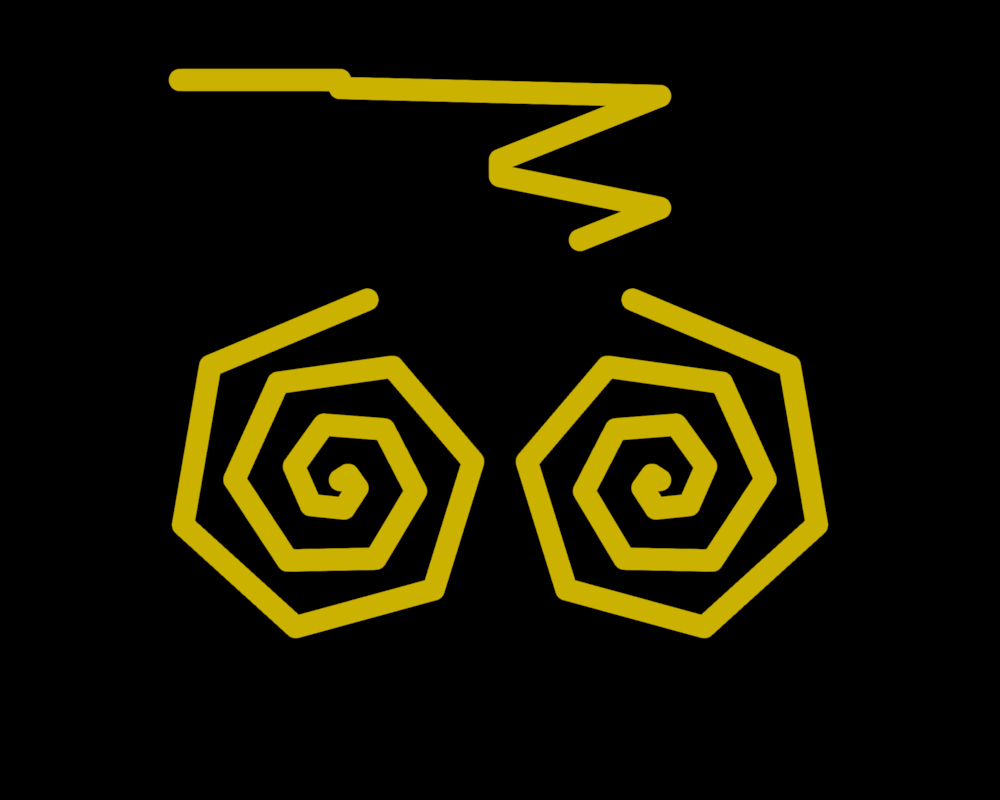
Drawing a line with a shape that makes it interesting for demonstrating/testing various aspects of line rendering. Use the middle-mouse button to set the position of the last point. Use ‘1’ and ‘2’ to toggle between normal and dashed mode.
import numpy as np
from rendercanvas.auto import RenderCanvas, loop
import pygfx as gfx
import pylinalg as la

canvas = RenderCanvas(size=(1000, 800))
renderer = gfx.WgpuRenderer(canvas)

scene = gfx.Scene()
scene.add(gfx.Background.from_color("#000"))

positions = [[200 + np.sin(i) * i * 6, 200 + np.cos(i) * i * 6, 0] for i in range(20)]
positions += [[np.nan, np.nan, np.nan]]
positions += [[400 - np.sin(i) * i * 6, 200 + np.cos(i) * i * 6, 0] for i in range(20)]
positions += [[np.nan, np.nan, np.nan]]
positions += [
    [100, 450, 0],
    [102, 450, 0],
    [104, 450, 0],
    [106, 450, 0],
    [200, 450, 0],
    [200, 445, 0],
    [400, 440, 0],
    [300, 400, 0],
    [300, 390, 0],
    [400, 370, 0],
    [350, 350, 0],
]

# Spiral away in z (to make the depth buffer less boring)
for i in range(len(positions)):
    positions[i][2] = i

line = gfx.Line(
    gfx.Geometry(positions=positions),
    gfx.LineMaterial(
        thickness=22.0, color=(0.8, 0.7, 0.0), alpha_mode="blend", aa=False
    ),
)
scene.add(line)

camera = gfx.OrthographicCamera(600, 500)
camera.local.position = (300, 250, 0)

controller = gfx.PanZoomController(camera, register_events=renderer)

alpha = 0
d_alpha = 0.05


@renderer.add_event_handler("key_down")
def change_material(event):
    if event.key == "1":
        line.material = gfx.LineMaterial(
            thickness=22.0, color=(0.8, 0.7, 0.0), aa=False
        )
    elif event.key == "2":
        line.material = gfx.LineMaterial(
            thickness=22.0, color=(0.8, 0.7, 0.0), opacity=0.5, aa=True
        )

    elif event.key == "3":
        line.material = gfx.LineMaterial(
            thickness=22.0,
            color=(0.8, 0.7, 0.0),
            dash_pattern=(4, 2, 3, 2, 2, 2, 1, 2, 0, 2),
            thickness_space="screen",
            opacity=0.5,
            aa=True,
        )
    elif event.key == "4":
        line.material = gfx.LineDebugMaterial(thickness=22.0, color=(0.8, 0.7, 0.0))
    elif event.key == "o":
        line.material.dash_offset += 4
    elif event.key == "a":
        line.material.aa = not line.material.aa
    elif event.key == "p":
        renderer.ppaa = "ddaa" if renderer.ppaa == "none" else "none"
    elif event.key == "r":
        renderer.pixel_ratio = 2 if renderer.pixel_ratio == 1 else 1
    renderer.request_draw()


@renderer.add_event_handler("pointer_move", "pointer_down")
def set_last_node(event):
    if event.modifiers:
        return
    if 3 in event.buttons or event.button == 3:
        w, h = canvas.get_logical_size()
        ndcx, ndcy = 2 * event.x / w - 1, 1 - 2 * event.y / h
        pos = la.vec_transform((ndcx, ndcy, 0), np.linalg.pinv(camera.camera_matrix))
        line.geometry.positions.data[-1, :2] = pos[0], pos[1]
        line.geometry.positions.update_range(len(positions) - 1, 1)
        renderer.request_draw()


def animate():
    line.material.dash_offset += 0.1
    renderer.render(scene, camera)
    canvas.request_draw()


if __name__ == "__main__":
    canvas.request_draw(animate)
    loop.run()
Total running time of the script: (0 minutes 0.405 seconds)
Gallery generated by Sphinx-Gallery
Interactive example
Try this example in your browser using Pyodide. Might not work with all examples and all devices. Check the output and your browser’s console for details.