Note
Go to the end to download the full example code.
Mesh Picking
Example showing picking a mesh. Showing two meshes that can be clicked on. Upon clicking, the vertex closest to the pick location is moved.
Transparent objects can also be picked, but if multiple semi-transparent layers are visible, its undetermined which is picked.
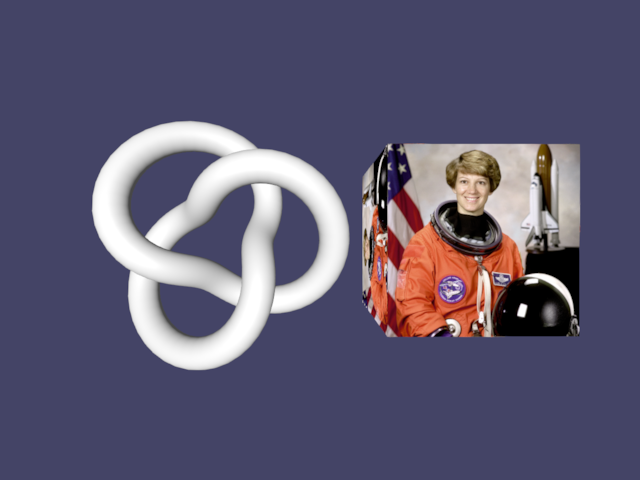
# todo: if we have per-vertex coloring, we can paint on the mesh instead :D

import numpy as np
import imageio.v3 as iio
from rendercanvas.auto import RenderCanvas, loop
import pygfx as gfx
import pylinalg as la


canvas = RenderCanvas()
renderer = gfx.renderers.WgpuRenderer(canvas)
scene = gfx.Scene()

scene.add(gfx.Background.from_color("#446"))

im = iio.imread("imageio:astronaut.png").astype(np.float32) / 255
tex = gfx.Texture(im, dim=2)

cube = gfx.Mesh(
    gfx.box_geometry(200, 200, 200),
    gfx.MeshBasicMaterial(map=tex, pick_write=True),
)
cube.local.x += 150
scene.add(cube)

torus = gfx.Mesh(
    gfx.torus_knot_geometry(100, 20, 128, 32), gfx.MeshPhongMaterial(pick_write=True)
)
torus.local.x -= 150
scene.add(torus)

camera = gfx.PerspectiveCamera(70, 16 / 9)
camera.show_object(scene)

scene.add(gfx.AmbientLight(), camera.add(gfx.DirectionalLight()))


def distort_geometry(event):
    info = event.pick_info
    if "face_index" in info:
        # Get what face was clicked
        face_index = info["face_index"]
        coords = info["face_coord"]
        # Select which of the three vertices was closest
        # Note that you can also select all vertices for this face,
        # or use the coords to select the closest edge.
        sub_index = np.argmax(coords)
        # Look up the vertex index
        vertex_index = int(event.target.geometry.indices.data[face_index, sub_index])
        # Change the position of that vertex
        pos = event.target.geometry.positions.data[vertex_index]
        pos[:] *= 1.1
        event.target.geometry.positions.update_range(vertex_index, 1)


torus.add_event_handler(distort_geometry, "pointer_down")
cube.add_event_handler(distort_geometry, "pointer_down")


def animate():
    rot = la.quat_from_euler((0.005, 0.01), order="XY")
    cube.local.rotation = la.quat_mul(rot, cube.local.rotation)
    torus.local.rotation = la.quat_mul(rot, torus.local.rotation)

    renderer.render(scene, camera)
    canvas.request_draw()


if __name__ == "__main__":
    canvas.request_draw(animate)
    loop.run()
Total running time of the script: (0 minutes 0.520 seconds)
Gallery generated by Sphinx-Gallery
Interactive example
Try this example in your browser using Pyodide. Might not work with all examples and all devices. Check the output and your browser’s console for details.