Note
Go to the end to download the full example code.
Dynamic Environment Map
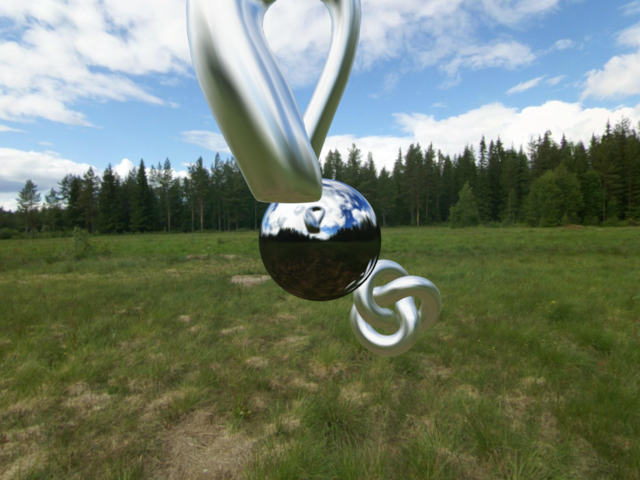
This example shows three objects.
Two rotating objects have a static env map that matches the skybox.
In the center is a sphere that has a dynamic environment map, which is updated using a CubeCamera. The two rotating objects are visible in the reflection of this object.
/home/docs/checkouts/readthedocs.org/user_builds/pygfx/checkouts/1273/examples/feature_demo/dynamic_env_map.py:36: DeprecationWarning: Setting the shape on a NumPy array has been deprecated in NumPy 2.5.
As an alternative, you can create a new view using np.reshape (with copy=False if needed).
  env_img.shape = 6, cube_size, cube_size, env_img.shape[-1]
import math
import time

import imageio.v3 as iio
import pylinalg as la
from rendercanvas.auto import RenderCanvas, loop

import pygfx as gfx
from pygfx.utils.cube_camera import CubeCamera

renderer = gfx.renderers.WgpuRenderer(RenderCanvas())
scene = gfx.Scene()


# Create the static env map

env_img = iio.imread("imageio:meadow_cube.jpg")
cube_size = env_img.shape[1]
env_img.shape = 6, cube_size, cube_size, env_img.shape[-1]

env_static = gfx.Texture(
    env_img, dim=2, size=(cube_size, cube_size, 6), generate_mipmaps=True
)

# Create the dynamic env map

env_dynamic = gfx.Texture(
    dim=2, size=(512, 512, 6), format="rgba8unorm", generate_mipmaps=True
)

cube_camera = CubeCamera(env_dynamic)

# Create a background skybox

background = gfx.Background(None, gfx.BackgroundSkyboxMaterial(map=env_static))
scene.add(background)

# Create the sphere

material1 = gfx.MeshStandardMaterial(roughness=0.05, metalness=1)
material1.side = "Front"
material1.env_map = env_dynamic
sphere = gfx.Mesh(
    gfx.sphere_geometry(15, 64, 64),
    material1,
)

scene.add(sphere)

# Create the other two objects

material2 = gfx.MeshStandardMaterial(roughness=0.15, metalness=1)
material2.env_map = env_static

ob1 = gfx.Mesh(gfx.geometries.klein_bottle_geometry(15), material2)
scene.add(ob1)

ob2 = gfx.Mesh(gfx.torus_knot_geometry(8, 3, 128, 16), material2)
scene.add(ob2)


# Camera and controller

camera = gfx.PerspectiveCamera(70, 16 / 9)
camera.show_object(scene, scale=2)

controller = gfx.OrbitController(camera, register_events=renderer)


def animate():
    t = time.time()

    ob1.local.position = (
        math.cos(t) * 30,
        math.sin(t) * 30,
        math.sin(t) * 30,
    )

    rot = la.quat_from_euler((0.02, 0.03), order="XY")
    ob1.local.rotation = la.quat_mul(rot, ob1.local.rotation)

    ob2.local.position = (
        math.cos(t + 10) * 30,
        math.sin(t + 10) * 30,
        math.sin(t + 10) * 30,
    )

    ob2.local.rotation = la.quat_mul(rot, ob2.local.rotation)

    cube_camera.render(scene)
    renderer.render(scene, camera)
    renderer.request_draw()


if __name__ == "__main__":
    renderer.request_draw(animate)
    loop.run()
Total running time of the script: (0 minutes 1.974 seconds)
Gallery generated by Sphinx-Gallery
Interactive example
Try this example in your browser using Pyodide. Might not work with all examples and all devices. Check the output and your browser’s console for details.