Note
Go to the end to download the full example code.
Custom Object
Example that implements a custom object and renders it.
This example draws multiple triangles. This is more or a full-fledged object.
It demonstrates:
How you can define a new WorldObject and Material.
How to define a shader for it.
The use of uniforms for material properties.
The implementation of the camera transforms in the shader.
How geometry (vertex data) can be used in the shader.
Shader templating.
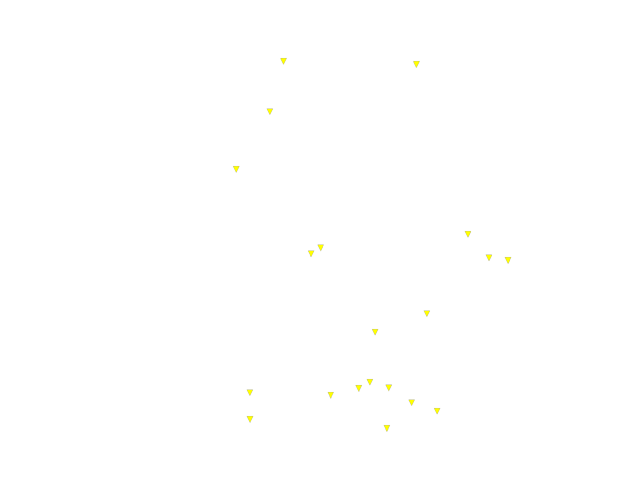
import numpy as np
import wgpu
from rendercanvas.auto import RenderCanvas, loop
import pygfx as gfx
from pygfx.renderers.wgpu import (
    Binding,
    BaseShader,
    register_wgpu_render_function,
)


# Custom object, material, and matching render function


class Triangle(gfx.WorldObject):
    pass


class TriangleMaterial(gfx.Material):
    uniform_type = dict(
        gfx.Material.uniform_type,
        color="4xf4",
    )

    def __init__(self, *, color="white", **kwargs):
        super().__init__(**kwargs)
        self.color = color

    @property
    def color(self):
        """The uniform color of the triangle."""
        return gfx.Color(self.uniform_buffer.data["color"])

    @color.setter
    def color(self, color):
        color = gfx.Color(color)
        self.uniform_buffer.data["color"] = color
        self.uniform_buffer.update_full()


@register_wgpu_render_function(Triangle, TriangleMaterial)
class TriangleShader(BaseShader):
    type = "render"

    def get_bindings(self, wobject, shared, scene):
        geometry = wobject.geometry

        # This is how we set templating variables (dict-like access on the shader).
        # Look for "{{scale}}" in the WGSL code below.
        self["scale"] = 0.2

        # Three uniforms and one storage buffer with positions
        bindings = {
            0: Binding("u_stdinfo", "buffer/uniform", shared.uniform_buffer),
            1: Binding("u_wobject", "buffer/uniform", wobject.uniform_buffer),
            2: Binding("u_material", "buffer/uniform", wobject.material.uniform_buffer),
            3: Binding(
                "s_positions", "buffer/read_only_storage", geometry.positions, "VERTEX"
            ),
        }
        self.define_bindings(0, bindings)
        return {
            0: bindings,
        }

    def get_pipeline_info(self, wobject, shared):
        # We draw triangles, no culling
        return {
            "primitive_topology": wgpu.PrimitiveTopology.triangle_list,
            "cull_mode": wgpu.CullMode.none,
        }

    def get_render_info(self, wobject, shared):
        # Determine number of vertices
        n = 3 * wobject.geometry.positions.nitems

        return {
            "indices": (n, 1),
        }

    def get_code(self):
        return """
        {$ include 'pygfx.std.wgsl' $}

        @vertex
        fn vs_main(@builtin(vertex_index) index: u32) -> Varyings {

            let vertex_index = i32(index) / 3;
            let sub_index = i32(index) % 3;

            // Transform object positition into NDC coords
            let model_pos = nonlinear_transform(load_s_positions(vertex_index));  // vec3
            let world_pos = u_wobject.world_transform * vec4<f32>(model_pos, 1.0);
            let ndc_pos = u_stdinfo.projection_transform * u_stdinfo.cam_transform * world_pos;

            // List of relative positions, in logical pixels
            var positions = array<vec2<f32>, 3>(
                vec2<f32>(0.0, -20.0), vec2<f32>(-17.0, 15.0), vec2<f32>(17.0, 15.0)
            );

            // Get position for *this* corner
            let screen_factor = u_stdinfo.logical_size.xy / 2.0;
            let screen_pos_ndc = ndc_pos.xy + {{scale}} * positions[sub_index] / screen_factor;

            // Set the output
            var varyings: Varyings;
            varyings.position = vec4<f32>(screen_pos_ndc, ndc_pos.zw);
            return varyings;
        }

        @fragment
        fn fs_main(varyings: Varyings) -> FragmentOutput {
            var out: FragmentOutput;
            let a = u_material.color.a * u_material.opacity;
            out.color = vec4<f32>(u_material.color.rgb, a);
            return out;
        }
        """


# Setup scene

renderer = gfx.WgpuRenderer(RenderCanvas())
camera = gfx.OrthographicCamera(10, 10)

t = Triangle(
    gfx.Geometry(positions=np.random.uniform(-4, 4, size=(20, 3)).astype(np.float32)),
    TriangleMaterial(color="yellow"),
)
t.local.x = 2  # set offset to demonstrate that it works

scene = gfx.Scene()
scene.add(t)


if __name__ == "__main__":
    renderer.request_draw(lambda: renderer.render(scene, camera))
    loop.run()
Total running time of the script: (0 minutes 0.174 seconds)
Gallery generated by Sphinx-Gallery
Interactive example
Try this example in your browser using Pyodide. Might not work with all examples and all devices. Check the output and your browser’s console for details.