Note
Go to the end to download the full example code.
Clearcoat effect
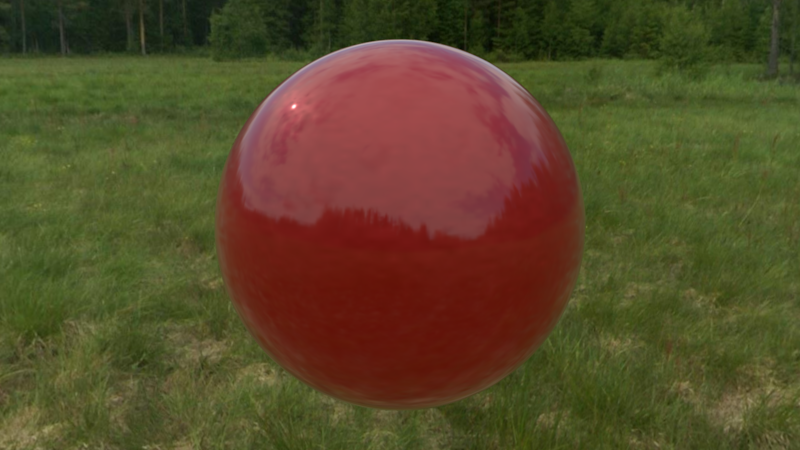
This example demonstrates the clearcoat effect.
Note
To run this example, you need a model from the source repo’s example folder. If you are running this example from a local copy of the code (dev install) no further actions are needed. Otherwise, you may have to replace the path below to point to the location of the model.
Once the path is set correctly, you can use the model as follows:
import imageio.v3 as iio
from rendercanvas.auto import RenderCanvas, loop
import pygfx as gfx
from wgpu.utils.imgui import ImguiRenderer
from imgui_bundle import imgui

# Init
canvas = RenderCanvas(size=(800, 450), title="clearcoat")
renderer = gfx.renderers.WgpuRenderer(canvas)
scene = gfx.Scene()

# Read cube image and turn it into a 3D image (a 4d array)
env_img = iio.imread("imageio:meadow_cube.jpg")
cube_size = env_img.shape[1]
env_img.shape = 6, cube_size, cube_size, env_img.shape[-1]

# Create environment map
env_tex = gfx.Texture(
    env_img, dim=2, size=(cube_size, cube_size, 6), generate_mipmaps=True
)

# Apply env map to skybox
background = gfx.Background(None, gfx.BackgroundSkyboxMaterial(map=env_tex))
scene.add(background)

material = gfx.MeshPhysicalMaterial(
    color=gfx.Color.from_physical(0.7, 0, 0, 1),
    metalness=0.3,
    roughness=0.4,
    clearcoat=1.0,
    clearcoat_roughness=0.0,
)
material.env_map = env_tex

normal_img = iio.imread(model_dir / "ClearCoatCarPaint_Normal.png")
normal_tex = gfx.Texture(normal_img, dim=2)

material.normal_map = gfx.TextureMap(normal_tex)
material.normal_scale = 0.2

m = gfx.Mesh(gfx.sphere_geometry(100, 100, 100), material)

scene.add(m)

# Add extra light more or less where the sun seems to be in the skybox
light = gfx.SpotLight(color="#444")
light.local.position = (-500, 1000, -1000)
scene.add(light)

# Create camera and controller
camera = gfx.PerspectiveCamera(45, 800 / 450)
camera.show_object(m, view_dir=(1.8, -0.6, -2.7))
controller = gfx.OrbitController(camera, register_events=renderer)


gui_renderer = ImguiRenderer(renderer.device, canvas)


def draw_imgui():
    imgui.set_next_window_size((250, 0), imgui.Cond_.always)
    imgui.set_next_window_pos(
        (gui_renderer.backend.io.display_size.x - 250, 0), imgui.Cond_.always
    )
    is_expand, _ = imgui.begin(
        "Controls",
        None,
        flags=imgui.WindowFlags_.no_move | imgui.WindowFlags_.no_resize,
    )
    if is_expand:
        changed, metalness = imgui.slider_float("metalness", m.material.metalness, 0, 1)
        if changed:
            m.material.metalness = metalness

        changed, roughness = imgui.slider_float("roughness", m.material.roughness, 0, 1)
        if changed:
            m.material.roughness = roughness

        changed, clearcoat = imgui.slider_float("clearcoat", m.material.clearcoat, 0, 1)
        if changed:
            m.material.clearcoat = clearcoat

        changed, clearcoat_roughness = imgui.slider_float(
            "cc_roughness", m.material.clearcoat_roughness, 0, 1
        )
        if changed:
            m.material.clearcoat_roughness = clearcoat_roughness

    imgui.end()


gui_renderer.set_gui(draw_imgui)


def animate():
    renderer.render(scene, camera)
    gui_renderer.render()
    canvas.request_draw()


if __name__ == "__main__":
    renderer.request_draw(animate)
    loop.run()
/home/docs/checkouts/readthedocs.org/user_builds/pygfx/checkouts/1273/examples/feature_demo/clearcoat.py:47: DeprecationWarning: Setting the shape on a NumPy array has been deprecated in NumPy 2.5.
As an alternative, you can create a new view using np.reshape (with copy=False if needed).
  env_img.shape = 6, cube_size, cube_size, env_img.shape[-1]
Total running time of the script: (0 minutes 1.185 seconds)
Gallery generated by Sphinx-Gallery
Interactive example
Try this example in your browser using Pyodide. Might not work with all examples and all devices. Check the output and your browser’s console for details.